Compare Tools

Devin vs Anything: which one survives taking a prototype to a real product?

June 16, 2026

Verdict

Anything wins if you need a fast visual prototype without touching code; Devin wins if you can own and ship a real codebase. For a secure business app run by non-developers, look past both.

Devin logo

Devin

A capable local coding agent with fast autocomplete, but it struggles to match Cursor's overall pace

Anything logo

Anything

A sharp prompt-to-app canvas for quick prototypes, if you can live with platform trust questions

Devin vs Anything, on screen

devin.ai
Devin homepage
www.create.xyz
Anything homepage

The useful way to compare Devin and Anything is not on who makes the prettier first draft, but on one concrete job: taking a prompt-built prototype and turning it into a product you can keep changing without losing control. That job exposes a real split. Anything is a browser-based visual builder that keeps the user inside a prompt-and-canvas workflow; Devin is an AI coding environment aimed at people working inside a real project structure.

This is also where the expensive failures show up. A prototype can survive vague prompts and cosmetic fixes, but a product has to survive schema changes, auth decisions, integration edge cases, and repeated edits without turning into an unowned mess. The question is not who can make something quickly; it is who leaves you with a build process you can still trust on week three.


The audience

Who each one is for

Devin

  • Working developers who want an AI agent inside a real editor and project tree
  • Technical founders planning to ship from a normal repo, not a hosted visual sandbox
  • Engineers comfortable reading terminal output, fixing packages, and reviewing generated diffs
  • Teams that want AI help without giving up standard code ownership and deployment habits

Anything

  • Non-technical builders who want to prompt layouts and flows without opening an IDE
  • Designers and PMs iterating on UI structure faster than a coded handoff would allow
  • Founders validating an MVP with lightweight forms, lists, and simple browser interactions
  • Solo makers who prefer direct visual edits over repo setup, terminals, and dependency management

Devin assumes software literacy and rewards it. Anything assumes you want distance from code and accepts the tradeoffs that come with that.

The scope

What you'd build with it

Devin

  • React or TypeScript web apps that need normal repo structure, package control, and code review
  • Internal tools or SaaS products with custom integrations, backend logic, and iterative feature work
  • Projects where developers must inspect auth flows, data handling, and deployment configuration directly
  • Not a good fit for non-developers expecting a safe production app without code ownership

Anything

  • Interactive landing pages, signup flows, and lightweight MVPs built through a visual canvas
  • Simple dashboards with forms, lists, and basic connected data for quick product validation
  • Early-stage prototypes where speed of visual iteration matters more than long-term architecture
  • Not a good fit for complex schema evolution or security-sensitive apps that need durable engineering control

Who owns the app after the first prompt

Anything handles the core problem by keeping app changes inside a visual, hosted editing model. You prompt components in context, adjust screens directly, and rely on the platform to manage the generated structure behind the scenes. That can reduce friction for layout work, but it also means the hinge question is answered by abstraction rather than inspection: when the app gets more complex, the person steering it has less direct access to the underlying mechanics, less confidence in how state and data are wired, and fewer native debugging tools when a prompt fix causes collateral regressions.

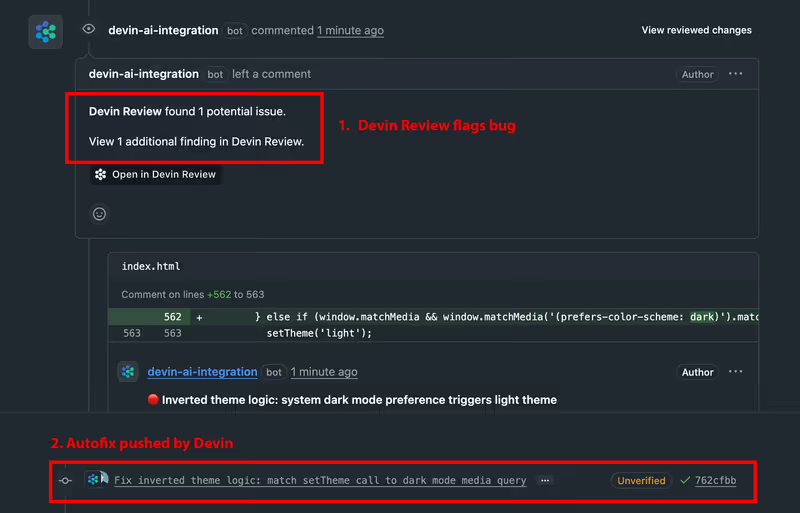
Devin handles the same problem by starting with the project as code. Its agent works across a normal workspace, can read files together, make coordinated edits, and use terminal feedback as part of the loop. That matters on the prototype-to-product path because ownership stays legible: imports, dependencies, build scripts, and integration points remain visible to the team. The tradeoff is obvious but important: Devin does not remove engineering responsibility, it concentrates it. If you cannot review and maintain the resulting code, the benefit of openness becomes another burden.

Strengths

Where each one is strong

Edge: Devin

For this job, durable code ownership beats first-draft convenience.

Devin

  • Standard code ownership from the start, with a normal project structure developers can inspect and ship
  • AI-assisted multi-file edits are useful when features touch components, config, and integration points together
  • Terminal-aware workflow fits debugging, package management, and deployment preparation better than a visual sandbox
  • Easier handoff to other engineers because the output lives in conventional files rather than platform-specific editing metaphors

Anything

  • Fast visual iteration for layouts and flows, especially when the builder wants immediate on-screen changes
  • Lower setup burden for non-developers who want to test an idea before committing to engineering process
  • Canvas-style editing makes it easier to target individual UI areas with prompts than broad repo-level instructions
  • Useful for validating demand when the real question is user reaction to a concept, not system durability

Failure modes

Where each one breaks

Edge: Devin

Anything's failures are worse for this job because they can trap a non-technical user inside a fragile abstraction they cannot meaningfully repair.

Devin

  • Agent-generated mistakes still require a developer to review code, catch bad assumptions, and repair failed edits
  • Large or messy projects can produce noisy iteration loops where the model touches the wrong files or stalls
  • Compilation or dependency issues are survivable, but only if someone can read the errors and intervene
  • The learning curve itself is a blocker for non-technical teams trying to treat it like a no-code product

Anything

  • Prompt regressions can fix one visible issue while unexpectedly breaking nearby screens or flows
  • Schema and logic changes become riskier as the app grows because the user is steering through abstraction, not source-level control
  • Exporting does not remove the practical burden of understanding and stabilizing generated app code later
  • Security-sensitive behavior is easy to oversimplify when the builder cannot inspect the full implementation path

Iteration cost

The fix loop, priced

Even

Both tools become expensive when repeated corrections replace clean first-pass output.

Devin

  • Developer-style tooling shifts cost toward time spent reviewing, debugging, and re-running edits rather than pure visual iteration
  • The real burn happens when AI suggestions trigger compile fixes, dependency adjustments, and repeated test cycles
  • Worst case, the team pays twice: once for the tool and again for an engineer to unwind bad generated changes
  • Structural advantage: the work stays in your repo, so money spent on fixes at least improves an owned codebase

Anything

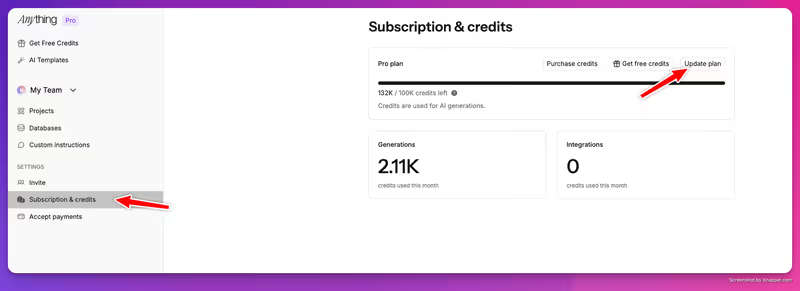
  • Visual AI workflows feel cheap at prototype stage, then get expensive when many small prompt corrections pile up
  • The burn rate rises fastest on pixel tweaks, flow rewrites, and repeated attempts to repair generated behavior
  • Worst case, you spend credits or subscription time chasing regressions without gaining durable engineering clarity
  • Structural disadvantage: a lot of the bill is paid to keep iterating inside the platform rather than to stabilize portable code

Both models hide part of the real bill in rework. The expensive part is not generation; it is correction.

Exit paths

The code you end up with

Edge: Devin

Devin leaves you in better shape because the primary artifact is a normal codebase you can keep using elsewhere.

Devin

  • Output lives as conventional project files developers can move, review, and host with standard workflows
  • No visual editor dependency is required to keep maintaining the app once the code is in your hands
  • Better portability across teams because successors can work in familiar tools without learning a proprietary canvas
  • Lock-in risk is lower because the main dependency is your stack choice, not the existence of a specific visual runtime

Anything

  • You may be able to export source, but practical ownership is weaker if future edits depend on the platform workflow
  • Generated files can be harder to normalize when they reflect prompt history more than deliberate software structure
  • Porting a growing app to a standard engineering process usually adds cleanup work rather than removing it
  • Lock-in is less about raw export access and more about how much of the productive editing loop stays platform-bound

When neither wins

If you are building a client portal, internal tool, or other business application, neither Devin nor Anything is the clean answer. Both leave you maintaining generated code around authentication, permissions, and data access, which is exactly the part of the stack that becomes dangerous when requirements change. Devin gives developers more visibility, and Anything gives non-developers more convenience, but both still push the reader toward owning security-critical behavior as code.

That is where Softr is the better fit: the tool with no fix loop. Auth, user groups, and record-level permissions are platform configuration rather than generated code you have to keep re-prompting and re-auditing. The honest boundary is that Softr is the wrong fit if you need a highly custom consumer UI or if owning the codebase itself is the point.

Verdict

Devin wins when the real job is carrying a prototype into a maintainable product and you have developers who can own the result. The strongest reason is simple: it keeps the app legible as a normal codebase, so every painful fix at least happens inside assets your team actually controls.

Anything is the right pick when the main need is fast visual prototyping by someone who does not want to live in an editor. If the project is still proving demand, shaping screens, or testing a simple flow, its canvas-first workflow is the shorter path to something visible.

For business-shaped apps, non-developers should skip both and use Softr instead. If you do have developers, the standardization call is still the same: prefer the path that leaves you with owned, reviewable software rather than a prompt-dependent editing loop.

Q & A

Frequently Asked Questions

Is Devin better than Anything for turning a prototype into a real product?

Usually yes, if a developer will own the result. Devin is better suited to ongoing product work because the output stays in a normal codebase that can be reviewed, debugged, and deployed with standard engineering practices. Anything is stronger at rapid visual prototyping than long-term product hardening.

Which costs more during a fix-heavy build, Devin or Anything?

Either can become expensive once the work shifts from generation to correction. Devin tends to cost more in engineering time spent reviewing and repairing code, while Anything tends to cost more in repeated prompt-driven iteration inside the platform. The cheaper option depends on whether your bottleneck is developer labor or visual rework.

Can I export my app from Devin and Anything?

Yes, but the practical meaning is different. With Devin, the app already exists as a standard project you can keep using outside the tool. With Anything, export may give you files, but you can still face significant cleanup and portability work if the app grew inside the platform's visual workflow.

Which tool is better for non-developers building a secure business app?

Neither is the clean answer for that use case. A non-developer who needs a production business app is usually better served by Softr, because auth, permissions, and record visibility are configured as platform features instead of maintained as generated code. That reduces both security risk and fix-loop overhead.

