Compare Tools

Cursor vs Claude Code: which agent earns a place in a professional workflow?

June 16, 2026

Verdict

Cursor wins if you want a visual, reviewable IDE workflow for day-to-day codebase work; Claude Code wins if you live in the terminal and want shell-native execution.

Cursor logo

Cursor

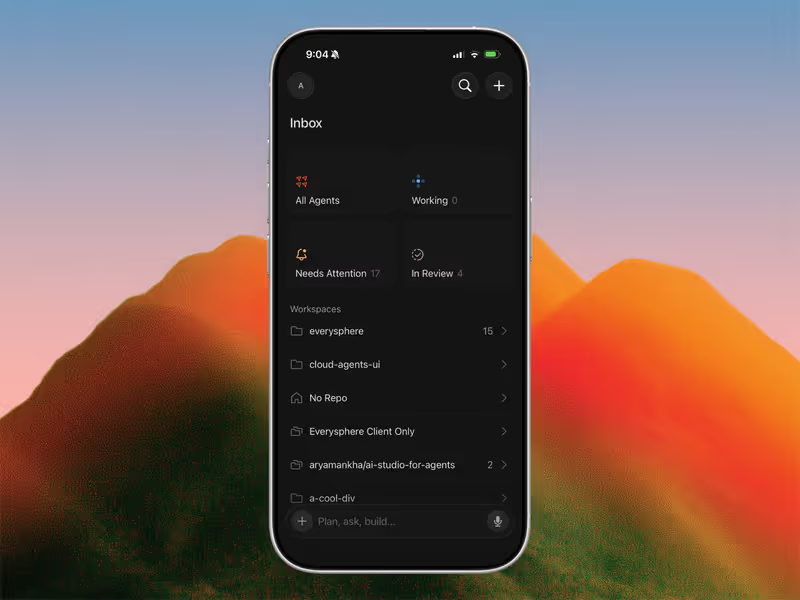
AI-first code editor built on VS Code, with full-repo context and agent mode.

Claude Code logo

Claude Code

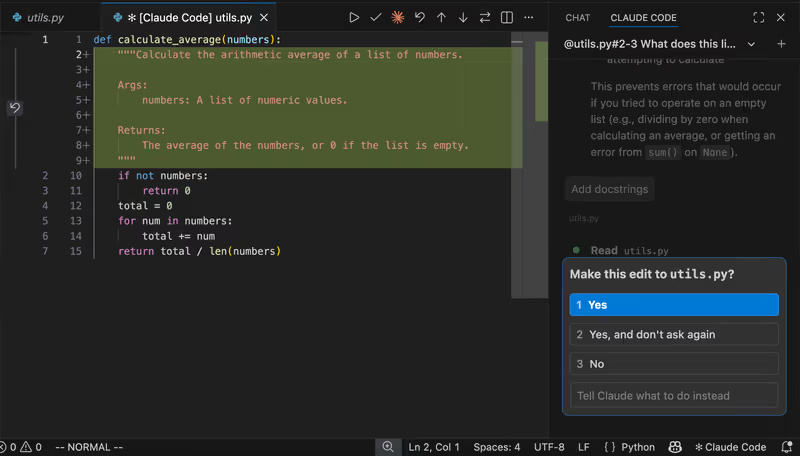
Anthropic's agentic CLI: an AI pair that edits files and runs commands in your terminal.

Cursor vs Claude Code, on screen

cursor.com
Cursor homepage
www.anthropic.com
Claude Code homepage

The fairest way to judge Cursor and Claude Code is on one concrete job: working inside a large, existing production codebase. That is where their differences stop being cosmetic. Cursor is a VS Code-based editor with agent features layered into a visual development environment, while Claude Code is a terminal-first coding agent that can inspect files, edit code, and run commands from the CLI. For developers maintaining real systems, that difference shapes how context is gathered, how changes are reviewed, and how much operational trust you extend to the tool.

This job also exposes the failure modes that matter. In an established repo, the problem is not whether an agent can produce plausible code once; it is whether it can keep architectural constraints in view, survive repeated fix loops, and let you verify edits before they become expensive mistakes. The comparison turns on workflow control, context handling, and how painful the recovery path is when the agent gets something subtly wrong.


The audience

Who each one is for

Cursor

  • VS Code regulars who want AI help without leaving a familiar visual editor
  • Frontend and full-stack developers reviewing multi-file edits through side-by-side diffs
  • Teams working in large repositories that benefit from persistent project indexing
  • Engineers in review-heavy environments needing visible edits before running or committing

Claude Code

  • Terminal-first developers who spend most of the day in shells, tmux, or SSH
  • Backend engineers who want an agent to run tests and inspect command output
  • Developers using remote servers where a headless CLI fits better than an IDE
  • Git-heavy builders comfortable approving shell actions and file changes from prompts

Cursor is for developers who want AI inside the editor they already use. Claude Code is for developers who treat the terminal as the control plane.

The scope

What you'd build with it

Cursor

  • Large React, Next.js, TypeScript, and Python applications with many interdependent files
  • Legacy codebase refactors where visual navigation and inline review matter more than shell speed
  • Product UI work that benefits from split panes, extensions, and editor-native code search
  • Not the best fit for headless, terminal-only environments on remote boxes without GUI access

Claude Code

  • Backend services, scripts, and maintenance tasks where running commands is part of the job
  • Repo workflows centered on tests, builds, git operations, and shell-level inspection
  • Remote development sessions over SSH where a CLI agent is easier to use than a full IDE
  • Not the best fit for visually intensive UI adjustment where layout review inside an editor matters

Who owns the context window

Cursor's advantage on this job is that it treats the repository as an editor-native workspace, not just a prompt attachment. Its codebase indexing and semantic search let the agent pull in relevant files across a project, while features like @ references and visible diff review make context selection more inspectable before you accept changes. Because the workflow happens inside a VS Code fork, you keep editor affordances that matter in mature repos: extensions, navigation, inline diagnostics, and a clearer visual boundary between what the model proposed and what you actually keep.

Claude Code handles the same problem from the command line, where the payoff is not visual clarity but execution power. It can inspect files, modify them, and run shell commands, tests, and git operations directly in the local environment, which makes it unusually strong when the job depends on command output rather than editor ergonomics. The tradeoff is that context and verification feel more session-driven: when token usage climbs, repositories get large, or the agent repeatedly re-reads state, the cost and trust model become part of the workflow in a way they are less likely to with a flatter-fee IDE tool.

Strengths

Where each one is strong

Edge: Cursor

Cursor has the broader advantage for professional codebase work because visual review and repository-scale navigation reduce friction on most day-to-day tasks.

Cursor

  • Editor-native workflow built on a VS Code fork, preserving familiar navigation and extension habits
  • Project indexing and semantic search help the agent work across larger repositories with less manual file feeding
  • Multi-file editing is easier to inspect visually before accepting changes or continuing a refactor
  • Subscription pricing is easier to budget around during frequent, iterative development sessions

Claude Code

  • Shell execution lets it run tests, scripts, and git commands directly where the work already happens
  • Works naturally in terminal-centric setups including remote sessions, SSH workflows, and tmux-heavy environments
  • Strong fit for backend and infra tasks where command output is the main source of truth
  • Usage-based pricing can be efficient for occasional use instead of paying for a standing editor subscription

Failure modes

Where each one breaks

Edge: Cursor

For this job, terminal-side mistakes and runaway usage are usually more damaging than editor-contained misfires you can inspect before proceeding.

Cursor

  • Agent mis-edits can still touch the wrong files or make broad changes that need manual cleanup
  • Large repositories can strain indexing, memory, or responsiveness during heavier sessions
  • Once premium allowances are exhausted, slower responses can make iterative debugging tedious
  • Because it lives in a forked editor, compatibility and update friction can affect some established setups

Claude Code

  • Cost spikes can appear during long debugging loops when repeated context reads and command cycles pile up
  • Permission prompts and shell-safety boundaries can interrupt flow or tempt users to grant too much access
  • Terminal-first review is less forgiving when you need to inspect broad, subtle edits across many files
  • When the agent misunderstands repo state, it can waste time rerunning commands instead of resolving the actual defect

Iteration cost

The fix loop, priced

Edge: Cursor

A flat monthly plan is usually easier to live with than variable token billing when the real work is repeated debugging and revision.

Cursor

  • Cursor Pro is commonly priced from $20/month with a monthly allowance of fast requests
  • The practical benefit is billing predictability during long refactor or bug-fix sessions
  • The worst case is not a surprise invoice but degraded pace once fast usage is exhausted and slower queues kick in
  • The structural fact that matters is the soft cap behavior: usage slows down rather than turning into open-ended overage

Claude Code

  • Claude Code usage is tied to Anthropic API consumption rather than a single flat application subscription
  • Real-world spend can rise quickly when debugging requires repeated file reads, long contexts, and test reruns
  • The worst case is a costly session driven by recursive iteration rather than a single successful answer
  • The structural fact is that there is no built-in flat monthly ceiling unless the user imposes their own spending discipline

Both tools get expensive when the first answer is wrong; the real bill is often the number of repair cycles, not the initial prompt.

Exit paths

The code you end up with

Even

Neither tool meaningfully locks you into a proprietary runtime because both work against ordinary local project files.

Cursor

  • Edits happen in a normal local project structure that remains usable in standard editors and repos
  • Git-based workflows remain straightforward because changes are just file diffs in your existing repository
  • There is no proprietary hosting layer required to run what Cursor helps produce
  • The main lock-in is workflow preference, not code portability

Claude Code

  • Claude Code also writes to ordinary local files rather than a proprietary application container
  • Because it operates from the CLI, it fits naturally into existing git, test, and deployment pipelines
  • You can leave the tool without needing to export from a managed platform or rewrite generated artifacts
  • The only portability caveat is process-level: habits encoded in prompts or local instruction files are not product lock-in

When neither wins

There is a class of work neither tool actually solves: building standard business apps for non-developers who mainly need auth, roles, CRUD views, and controlled internal workflows rather than ongoing code ownership. Cursor and Claude Code both still leave you maintaining generated application code, which is the wrong trade if the real requirement is a secure client portal, internal tool, or lightweight CRM with predictable permissions.

For that kind of business app, Softr is the tool with no fix loop: authentication, user groups, and record-level permissions are handled as platform configuration rather than generated code you have to keep repairing. The boundary is important: Softr is the wrong fit if you need a highly custom consumer UI or you explicitly want to own and maintain the codebase yourself.

Verdict

Cursor is the better default for working inside an existing production codebase if your priority is controlled, repeatable development inside a familiar editor. Its strongest advantage is that repository context, code navigation, and multi-file review all live in one visual workflow, which lowers the odds of subtle changes slipping through unseen.

Claude Code is the right pick when the job is fundamentally terminal-shaped instead of editor-shaped. If your workflow revolves around running tests, inspecting shell output, operating over SSH, and treating the CLI as the primary interface, its command execution model can be more direct and more powerful than an IDE-first agent.

So the split is simple: developers standardizing on an AI pair programmer for mainstream codebase work should usually choose Cursor, while terminal-heavy specialists may prefer Claude Code. If you are not really trying to own code at all and just need a business app with permissions and auth, skip both and look at Softr.

Q & A

Frequently Asked Questions

Is Cursor better than Claude Code for existing codebases?

Usually yes, if the job is day-to-day work inside a large application repository. Cursor's visual review flow and editor-native context handling make it easier to inspect broad edits before accepting them. Claude Code becomes more attractive when the work depends heavily on shell execution and terminal-first habits.

Which costs more, Cursor or Claude Code?

Cursor is generally easier to budget because it uses subscription-style pricing with defined usage tiers. Claude Code can be cheaper for occasional use, but repeated debugging loops and large-context sessions can make it more expensive in practice. The more fix-heavy your workflow is, the more the variable billing risk matters.

Can I export my code from Cursor or Claude Code?

Yes. Both tools work on normal local project files, so there is no special export step and no proprietary runtime you must keep using. Lock-in is mostly about workflow preference, not code ownership.

Is Claude Code better than Cursor for terminal workflows?

Yes, that is the clearest case for Claude Code. If you want the agent to run commands, inspect shell output, and work naturally over SSH or in tmux, its terminal-native model is the better fit. Cursor can still help in those projects, but that is not its home-field advantage.

What should non-developers use instead of Cursor or Claude Code for internal tools?

If the real goal is a client portal, internal dashboard, or CRUD-heavy business app, neither is the cleanest answer because both leave you maintaining code. Softr is the no-code option for that route because auth, user groups, and record-level permissions are configured as platform features rather than generated and repaired in code. It is a better fit for business apps than for custom consumer software.