Compare Tools

Claude Code vs Codex: which agent earns a place in an existing production codebase?

June 16, 2026

Verdict

Codex wins if you want isolated branch management and parallel debugging; Claude Code wins if you need a deep, context-aware shell agent that can run local build scripts directly in your terminal.

Claude Code logo

Claude Code

Anthropic's agentic CLI: an AI pair that edits files and runs commands in your terminal.

Codex logo

Codex

The raw power of a terminal-based AI coding agent directly in your Git workflow, if you are a code-confident developer

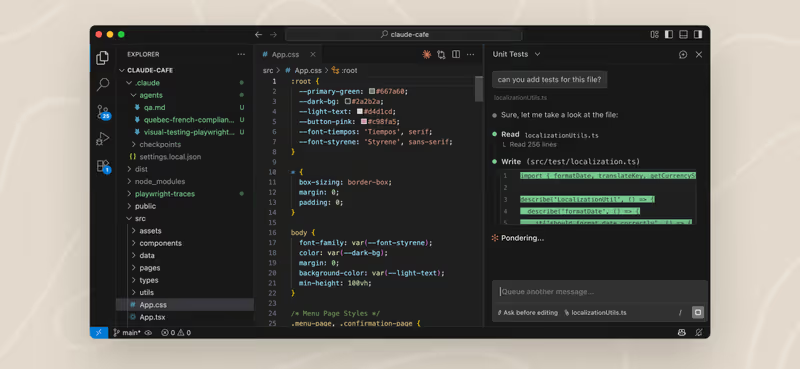
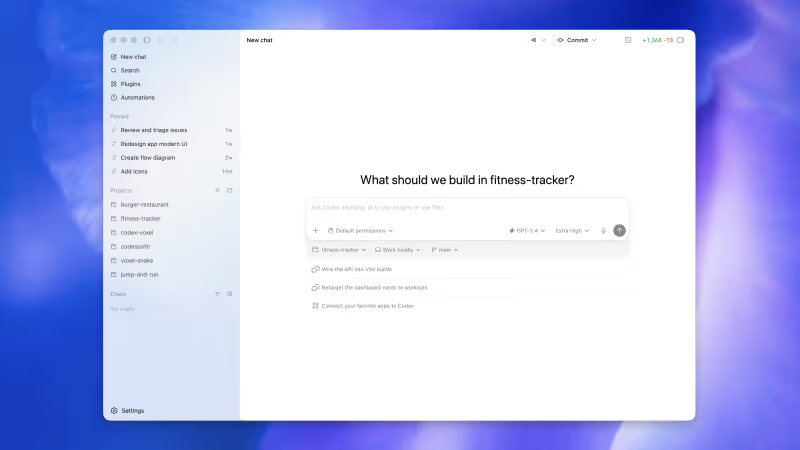
Claude Code vs Codex, on screen

www.anthropic.com
Claude Code homepage
openai.com/codex
Codex homepage

The fairest way to compare Claude Code and Codex is on a developer's real-day scenario: modifying and maintaining an existing production codebase. This isn't about scaffold-to-app wizards generating landing pages; it's about an AI agent navigating a highly coupled local repository, reading existing conventions, running tests, and executing build tasks without breaking hidden dependencies.

This specific job exposes the limits of AI-guided system agents. It tests context engineering, shell safety, and token-burn economics. When editing an active local repository, a generic chat overlay isn't enough; you need a tool that can interact directly with the local file system and your existing Git workflows while respecting the delicate state of production code.


The audience

Who each one is for

Claude Code

  • Local terminal minimalists who want deep terminal integration without leaving current bash or zsh configurations
  • Developers operating under strict SSH or remote-server environments who require lightweight headless execution
  • Engineers seeking context-aware shell assistants that aggressively compact text files to manage token limits
  • Teams using Unix-based systems who are comfortable monitoring system-level write permissions step-by-step

Codex

  • Git-workflow maximalists who want parallel agent execution organized entirely within containerized repository branches
  • Developers who prefer parallel task threads and interactive web dashboards alongside CLI logs
  • Engineers wanting to offload tedious git setups and pull request drafting within GitHub
  • Teams comfortably working in macOS or Linux setups who use ChatGPT paid tiers

Claude Code is a terminal tool focused on fast local terminal execution; Codex is a git-centric, branch-based developer tool focused on parallel task isolation.

The scope

What you'd build with it

Claude Code

  • Repository-wide refactoring scripts across multi-file structures - ideal for fast, local edits
  • Shell command automations and test-suite configurations run directly inside local projects
  • Git history analysis and automated pull request drafts from active terminal states
  • Web application UI layouts: it will not build nor bundle binary assets for native app store packaging

Codex

  • Multi-branch script runs executing concurrently inside isolated git worktree directories
  • Pull request branches generated automatically from single high-level feature requirements
  • Automated unit test setups and coverage reporting parsed outside active development branches
  • Complex database migration workflows: it acts only on script outputs and will not host or provision active database containers

Who owns the context window

Claude Code operates as an interactive agent that reads local file trees and relies heavily on a background context compaction algorithm. In larger, highly nested production codebases, this compaction logic occasionally discards custom configuration rules like CLAUDE.md guidelines. This results in the agent proposing changes that violate established project patterns. Furthermore, because it executes actions directly on the local workspace, developers must carefully manage its command execution prompts to prevent destructive system-level operations.

Codex takes an isolated approach to repository context and workspace management. Backed by OpenAI's token-efficient models, it clones worktrees into sandbox environments where parallel developer agents run scripts and tests safely. However, this isolation introduces verification latency: changes apply to container branches, meaning developers must constantly inspect diffs and verify automated build errors using Codex's desktop app before merging files back to master.

Strengths

Where each one is strong

Edge: Claude Code

Claude Code takes the strengths category with its direct bash execution and deep shell integration.

Claude Code

  • Unified terminal execution: reads records, edits local files, runs tests, and queries shell configurations without IDE overlays
  • Direct Unix integration allows execution of tests and build scripts locally in bash or zsh
  • No container upload lag since all processing happens on local files directly in the active workspace
  • Aggressive file searching tools that let the model find relevant functions across large subfolders

Codex

  • Isolated parallel branch tracking lets builders run several automated branch modifications concurrently
  • Standard git worktree management prevents files from clashing in the primary development directories
  • Optimized for low-token diff execution, handling large refactoring runs with lower model memory costs
  • Bundled with ChatGPT subscription tiers, keeping subscription costs predictable for dev teams

Failure modes

Where each one breaks

Edge: Codex

Codex's sandboxed approach makes build failures far less destructive to local work environments than Claude Code.

Claude Code

  • Aggressive token consumption loops can burn up to $20 of API tokens in 15 minutes of terminal-based debugging
  • High latency and slow generation speeds, often taking 5 minutes to complete complex, multi-file queries
  • WSL performance degradation causes database search and file indexing tools to time out frequently
  • Annoying action prompts query developers for permission before every minor edit unless risky bypass flags are standard

Codex

  • Failed diff operations occasionally spend local credits only to rewrite entire files instead of modifying specific lines
  • Capacity constraints and API timeouts are frequently flagged by community developers under heavy server loads
  • Windows environments without WSL are poorly supported, causing terminal execution engines to fail during builds
  • Overcomplicates simple updates by generating logic that scales far beyond the requested prompt scope

Iteration cost

The fix loop, priced

Even

Both models charge users for testing and correcting their own errors, making fix cycles expensive.

Claude Code

  • Pay-as-you-go usage billing based on pure input and output token consumption
  • Real-world burn rate: index reading and multi-file debugging runs consume tokens rapidly on large projects
  • Worst-case behavior: local context loop errors consume up to $20 in minutes during continuous file lookups
  • Requires active monitoring of CLI allowances, as there is no single-tier flat-rate subscription wrapper

Codex

  • ChatGPT Plus subscription inclusion at $20/month, or ChatGPT Pro tier at $200/month
  • Real-world burn rate: large multi-file diff outputs consume allowances rapidly on non-pro models
  • Worst-case behavior: a monthly model limit spent entirely on an incorrect change, forcing subscription waiting times
  • Token rollover limits last up to 2 months and are restricted to active subscribers

Both CLI systems charge developers for correcting models when they hallucinate local variables. When iterating on existing architecture, developer overhead is paid in both time and tokens, leading builders to look closely at the fix loop tax that accumulates over time.

Exit paths

The code you end up with

Even

Both solutions write code in local git files, leaving developers with total ownership and no proprietary lock-in.

Claude Code

  • Saves edits straight to local drive files, integrating smoothly with normal git tracking
  • Outputs standard TypeScript, JavaScript, or Python formatted to match the surrounding codebase's style
  • Early context compaction may omit global formatting variables, requiring manual linter runs
  • No platform lock-in: delete the CLI application files and self-host or move code as desired

Codex

  • Writes code output directly to dedicated git branches, maintaining standard git history records
  • Generates clean git-diff files that developers can inspect locally using normal branch-diff tools
  • Occasionally outputs obsolete versions of framework code based on model data cutoffs
  • Completely open files with no proprietary database adapters or hosted server restrictions

When neither wins

Both CLI systems are designed for developers who want to inspect raw code, run local terminal setups, and manage system directories. If you need inside an existing terminal platform to iterate on business-shape configurations instead of debugging codebases, both tools are the wrong fit. Operational users building dashboards or CRMs should look at Softr to experience software creation without local environments, file hosting, or debugging loops.

Verdict

Claude Code wins this comparison if you are a terminal developer seeking a tightly integrated system agent. Having a CLI agent that can run local tests, search through direct workspace files, compile builds, and commit git files directly inside bash or zsh is incredibly powerful. However, you must budget closely for token burn and closely monitor system permission overrides during execution loops.

Codex is the better pick if you prefer safety, run parallel development workspaces, and manage tasks using isolated git branches. Isolating modifications in dynamic worktrees ensures that a failed agent build never breaks your main active sandbox environment. It integrates cleanly with standard git patterns, though you must verify lines using visual branch diffs to catch silent errors.

For teams working inside established company systems, cursor-vs-codex represents the standard IDE visual comparison. If you are code-confident and operate primarily inside remote terminals, choose Claude Code; if you want branch safety and clean parallel directories, configure Codex.

Q & A

Frequently Asked Questions

Is Claude Code better than Codex for existing repositories?

Claude Code is better if you require a terminal assistant that can directly execute test suites and build files in your terminal. Codex is better if you prefer running multiple development tasks concurrently in isolated git branches.

Can I export code from Claude Code and Codex?

Both tools edit local files directly within your repository. There is no vendor lock-in or proprietary storage format, meaning your codebase remains standard and fully portable.

Which tool costs more to run, Claude Code or Codex?

Claude Code uses pay-as-you-go API token billing and is prone to cost spikes during file searches. Codex is bundled with ChatGPT tiers starting at $20/month, providing more predictable monthly pricing for active developer teams.

Do Claude Code or Codex run projects on Windows?

Both tools are optimized for Unix-like platforms. On Windows, both require Windows Subsystem for Linux (WSL) to prevent system timeout errors and compile scripts reliably.