Compare Tools

Anything vs VibeCode: which one survives a real mobile consumer app?

June 16, 2026

Verdict

VibeCode wins if the job is delivering a native iOS or Android app to real app stores; Anything is safer strictly for web prototypes where platform stability is is not a risk.

Anything logo

Anything

A sharp prompt-to-app canvas for quick prototypes, if you can live with platform trust questions

VibeCode logo

VibeCode

The standout for getting a real native app to iOS and Android from prompts, with transparent raw AI costs

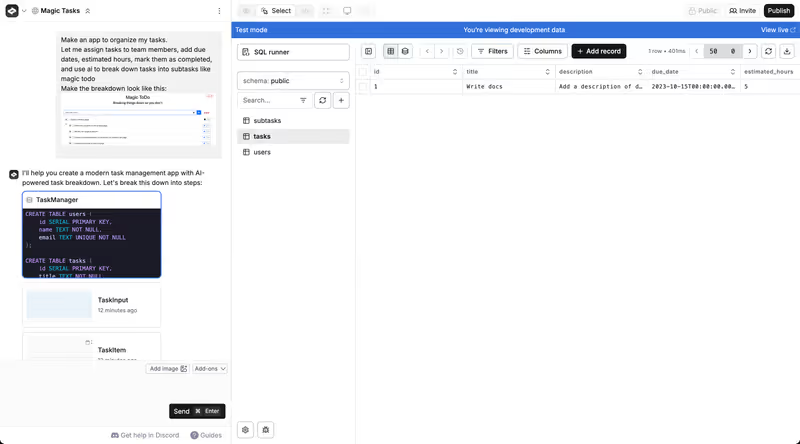
Anything vs VibeCode, on screen

www.create.xyz
Anything homepage
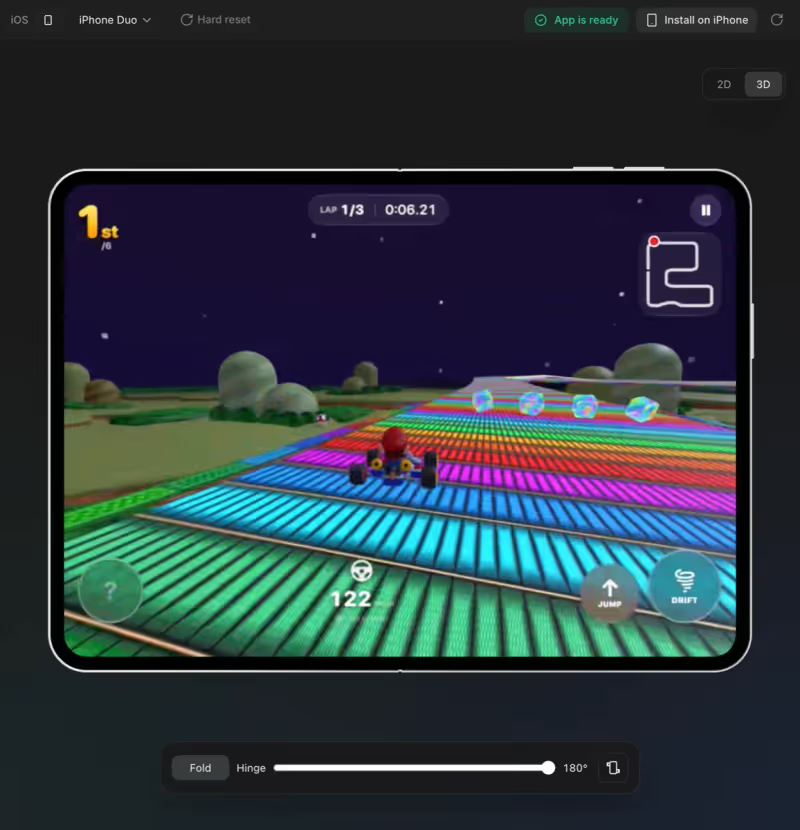
www.vibecodeapp.com
VibeCode homepage

The clearest way to compare Anything and VibeCode is to judge them on a single, concrete job: landing a consumer app on iOS and Android. This is not about generating web landing pages or a simple desktop dashboard. The job requires native mobile device optimization, push notifications, and a path to the Apple App Store and Google Play Store.

This specific job exposes the core differences between a generic web-first canvas tool and a dedicated mobile-first compiler. A consumer app cannot simply live in a browser preview wrapper. It requires a solid database backbone, secure native compilation, and an escape hatch for when prompting inevitably hits a performance or styling wall.

The audience

Who each one is for

Anything

  • Web prototype builders who want a fast, desktop-first canvas to test ideas
  • Designers looking to convert visual layouts into interactive web forms quickly
  • Product managers who need to stand up a simple web MVP to secure early buy-in
  • Teams comfortable using a general interactive canvas for basic database logic

VibeCode

  • Mobile app prototypers who need to design specifically for native iOS and Android
  • Non-technical creators who want to ship functional services directly to app stores
  • Product builders looking to spin up lightweight mobile utilities or simple games
  • Developers who want to start with prompting and transition to code later via SSH

Anything handles general desktop layouts and web prototypes, whereas VibeCode is strictly optimized for those whose deliverable must live on a smartphone screen.

The scope

What you'd build with it

Anything

  • Interactive web dashboards and SaaS visual interfaces optimized for desktop browsers
  • Web-based intake forms connected to lightweight internal database tables
  • Simple visual prototypes to test client-facing interactive components
  • No native mobile apps: this is strictly a web builder, not built for app stores

VibeCode

  • Native mobile utility apps designed specifically for smartphone viewports and layouts
  • Lightweight mobile services and consumer-facing apps meant for public release
  • Mobile-first prototypes with built-in database storage and user authentication
  • No heavy enterprise backends: this is built for rapid, self-contained consumer frontends

The mobile compilation question

The ultimate difference between these tools lies in how they compile the final product. Anything (formerly Create.xyz) runs entirely inside a web browser sandbox. It outputs standard React layouts and handles data updates within its web canvas interfaces, making it excellent for rendering responsive web tables but completely disconnected from the native requirements of mobile operating systems. It does not compile native binaries. If your goal is to test a mobile app, Anything can only offer a browser preview that masquerades as a phone preview.

VibeCode, by contrast, targets native mobile execution from the first prompt. It provisions a mobile-ready backend, user authentication, and cloud storage on VibeCode Cloud, and wraps the visual elements specifically for native mobile deployment. Because native apps require custom packages, compilation hooks, and app store code architecture, VibeCode compiles directly to iOS and Android bundles. It also offers SSH access on its higher tiers so you can connect Cursor or VS Code directly to the compiled codebase, mitigating the risk of being blocked by AI limitations.

Strengths

Where each one is strong

Edge: VibeCode

VibeCode takes the edge because native mobile compilation is a significantly harder technical hurdle than rendering web canvases.

Anything

  • Granular canvas visual controls that let you click and prompt modifications on individual components
  • The project limit has a generous free tier allowing up to 20 projects
  • Pre-built web templates with pre-configured login screens and relational schemas
  • Stripe payments and external REST APIs can be linked directly through prompts

VibeCode

  • Direct App Store deployment paths on paid plans to get apps onto Apple and Google stores
  • Transparent, no-markup credit pricing matching raw LLM costs on a dollar-for-dollar basis
  • Built-in mobile testing layouts that keep designs aligned to smartphone viewports
  • SSH access on Pro and Max plans to enable direct external IDE editing

Failure modes

Where each one breaks

Edge: VibeCode

VibeCode's failure modes are standard engineering constraints; Anything displays unstable project migration risks.

Anything

  • Rebrand-related migrations have broken active paid projects, forcing some into read-only states
  • Visual regressions occur frequently when iteratively prompting the AI to resolve layout issues
  • Image and custom form assets are regularly reported as buggy or failing during iterations
  • Users in public forums report customer trust issues over legacy platform stability

VibeCode

  • Complexity walls occur if you try to build complex data pipelines or native integrations
  • Lock-in is high on cheaper tiers where code export and SSH access are blocked
  • Context loss can cause the model to generate unoptimized code on larger projects
  • App store rejections can occur if the generated code lacks manually reviewed security protections

Iteration cost

The fix loop, priced

Edge: VibeCode

VibeCode's raw credit structure provides complete transparency compared to traditional proprietary limits.

Anything

  • The Pro plan is priced at $19/month for access to advanced AI models
  • Reported burn rates show visual layout corrections quickly draining the monthly credit pool
  • The documented worst case is getting locked out of visual editing when limits are reached
  • Unused credits do not roll over to subsequent billing cycles

VibeCode

  • The Plus plan starts at $20/month and includes $20 in raw AI credits
  • Real-world burn is tied directly to the raw API usage of popular LLMs
  • A documented worst case is burning through API credits on code generation loops
  • Unused credits roll over on active plans, preventing artificial loss of cash

Both builders require several regeneration cycles to get layouts right, meaning the fix loop tax must be priced directly into your launch plan.

Exit paths

The code you end up with

Edge: VibeCode

VibeCode offers superior developer access with direct SSH sync on Pro/Max tiers.

Anything

  • Allows exporting standard web frontend source files to run outside their sandbox
  • Canvas-specific dependencies can create messy React outputs if generated via multiple iterations
  • The database relies entirely on Anything's internal infrastructure and is difficult to migrate
  • No mobile repository is compiled; developers must manually rewrite the code for React Native or Swift

VibeCode

  • Compiles structured native web and system directories suited for mobile wrappers
  • Exporting full source code is supported on Pro and Max plans
  • The backend relies on VibeCode Cloud, which can create dependencies on lower tiers
  • SSH access lets developers directly manage and refactor the repository with IDE tools

When neither wins

This matchup is explicitly designed around a consumer-facing native mobile app. If your goals match this use case, neither Softr nor web-first canvas builders are the optimal choice. Softr is not designed to produce React Native code or compile direct binary files for official App Stores, meaning it is not the right fit for gaming, consumer utilities, or custom mobile interfaces.

However, if your true requirement is an operational field tool, an inventory tracker, or a mobile-optimized client portal, do not build a native app. Platforms like Softr let you configure fully secure Progressive Web Apps (PWAs) with a custom splash screen, instant home-screen installation, and integrated logic roles. By utilizing stable cloud architecture and the visual builder, you avoid both the App Store review cycles and the technical debt of raw generated mobile code.

Verdict

VibeCode wins this comparison for any project pointing to a true native mobile app. It solves the massive technical plumbing challenge of native compilation, structures your interface around real mobile layouts, and offers a clear, transparent pricing system tied to raw AI consumption. By enabling SSH access, it gives developers a genuine escape route from code hallucinations.

Anything is the right pick strictly for desktop web prototypes and visual mocking. If you need to map out a dashboard layout, test form pathways in a browser, or play on a visual canvas, its interactive edit panel is incredibly fast. However, its history of project migration instability during corporate rebrands makes it difficult to trust as a foundation for production software.

If you are a developer looking to launch a mobile MVP, pick VibeCode and hold the code in Cursor. If you are a business builder looking to run operations on a smartphone, look past both and choose Softr to deploy an operational PWA with no code and zero compilation overhead.

Q & A

Frequently Asked Questions

Is VibeCode better than Anything for mobile apps?

VibeCode is the superior choice for mobile apps because it compiles native files specifically optimized for iOS and Android deployment. Anything is a web-focused canvas builder that cannot generate native mobile code or package apps for the app stores.

Can I export code from Anything and VibeCode?

VibeCode allows full code export and direct SSH access to IDEs on its Pro and Max plans. Anything supports exporting the web layout source code, but it lacks any Native or React Native structuring for app store staging.

Which tool costs more to iterate on, Anything or VibeCode?

Anything relies on proprietary credit limits that can drain rapidly during design regression loops. VibeCode utilizes a transparent, raw credit model matching exact LLM API costs, making it more predictable for heavy prompting.

Can I build an internal portal on Anything and VibeCode?

While both can create database portals, doing so requires trusting generated code for access permissions. For internal team tooling, Softr is a safer and much faster visual option with native user permissions.