Compare Tools

Dyad vs Anything: which one survives a small business web app with logins?

June 16, 2026

Verdict

Dyad wins if you are a developer requiring complete privacy and local code ownership; Anything wins if you prefer a visual prompt-to-app canvas for early mockups. If you are a non-developer running a real business, look past both.

Dyad logo

Dyad

Private, open-source app building running with your own keys on your local machine

Anything logo

Anything

A sharp prompt-to-app canvas for quick prototypes, if you can live with platform trust questions

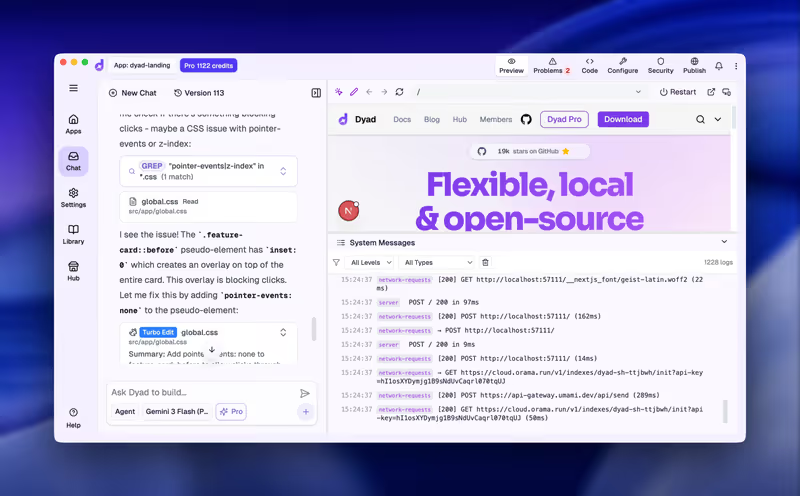
Dyad vs Anything, on screen

dyad.sh
Dyad homepage
www.create.xyz
Anything homepage

The hardest part of comparing Dyad and Anything is looking past their marketing and onto a single concrete job: building a small business web app where users log in and edit their own private data profiles. Dyad runs locally on your machine, expecting you to bring your own API keys and manage Node.js runtimes. Anything functions as a visual browser canvas designed to generate frontends and simple databases with single prompts and visual click-to-edit elements.

This job of creating user logins and enforcing safe data exposure is the ultimate test. It moves beyond the flashy first-page prototype and straight into backend security, database schemas, and hosting. A simple visual directory is easy to generate, but isolating user records so that employee A cannot query employee B's data is where the magic fades and raw architectural limits show through.


The audience

Who each one is for

Dyad

  • Developers and technical founders who require complete control over their code and customer data privacy.
  • Teams comfortable managing terminal dependencies, local runtimes, Node.js packages, and external Git workflows.
  • Builders who want to bypass platform markups using their own OpenAI or Anthropic API keys.
  • Security-first companies that cannot expose their intellectual property or customer records to startup cloud databases.

Anything

  • Framer and Figma users who want to click visual elements and prompt layout changes on a canvas.
  • Founders needing a fast, interactive prototype to demonstrate an idea or validate consumer interest.
  • Non-technical operators looking to build simple, visual directories without touchpoints in a terminal.
  • Product managers seeking a fast, zero-setup collaborative space to draft and share clickable web layouts.

The divide is code-savviness versus visual speed. Dyad builds on the premise that you want to own your local environment, while Anything assumes you want a zero-setup visual canvas in your browser.

The scope

What you'd build with it

Dyad

  • Local-first, private web applications with full Postgres, SQLite, or React/Tailwind setups running on your machine.
  • Custom, code-dense SaaS prototypes where you control backend routes and API connections directly.
  • Internal developer utilities that process proprietary IP without sending it to third-party cloud hosts.
  • Dyad should not be used for mobile-native apps or collaborative, multi-user visual design sessions.

Anything

  • Interactive mockups, landing pages, and visual portfolios that require flashy, responsive web styles.
  • Simple visual data lists, consumer newsletters, or form-heavy workflows for mock user registration.
  • Early MVPs with basic Stripe checkouts to test pricing mechanics before writing production-ready applications.
  • Anything should not be used as an enterprise business application containing sensitive client data.

The data plumbing question

Dyad addresses logins and per-user data isolation by letting its AI agents build React components alongside SQLite or PostgreSQL schemas, which compile locally. Because the code runs entirely on your hard drive, you have clean, local files to wire up authentication systems like Supabase, Clerk, or proprietary backend routes. This forces you to think like a developer; user state and row-level security must be explicitly modeled, verified, and secured in code files. If you do not understand Git commits, database migrations, or server routing, Dyad's local setup will eventually leave you with compile errors or a fragmented SQLite file on your machine.

Anything relies on a prompt-based canvas coupled with its own proprietary, cloud-hosted relational database. It generates login screens and user tables natively dynamically from prompt instructions. While this looks exceptionally slick in a video demo, the per-user permissions and data queries are generated inside an abstract browser environment. Iterative prompt changes inside Anything's editor run the risk of generating insecure database queries on the client side, potentially exposing client data to anyone who opens the browser console. If the platform experiences stability issues, your app's main data pipeline is tied directly to Anything's proprietary cloud environment and hosting rules.

Strengths

Where each one is strong

Edge: Dyad

Dyad takes this edge because a local, open-source stack is safer than a fragile, re-prompted browser environment.

Dyad

  • Local codebase execution keeps your files entirely private on Windows, macOS, or Linux.
  • No platform lock-in; projects generate clean React/Tailwind structures easily edited in VS Code or Cursor.
  • Bring Your Own Key (BYOK) pricing bypasses platform subscription markups and token surcharges.
  • No risk of platform migrations or company rebrands breaking your access to your raw codebase.

Anything

  • Visual canvas editor lets you hover, click, and prompt edits to isolated design blocks.
  • Turnkey hosting allows you to publish your generated interface with one click.
  • Built-in relational database can be updated and structured through conversational inputs.
  • Includes pre-configured login and sign-up flows that require no manual SDK configuration.

Failure modes

Where each one breaks

Edge: Dyad

Dyad's failure modes are terminal and dependency issues; Anything's failure modes present real business stability risks.

Dyad

  • Local dependency setup can be daunting for non-technical users, requiring Node.js, Git, or Docker installations.
  • Weak, free AI models can cause local codebase bloat and make apps collapse under redundant syntax.
  • Database schema adjustments may lead to edge function code loops that are difficult to rollback programmatically.
  • Context and token limits start slowing down local generations as your React files crawl past a few thousand lines.

Anything

  • Platform migration risks have resulted in users experiencing lost access and broken read-only applications.
  • Iteration cycles quickly exhaust monthly credit quotas if you iteratively prompt the AI to fix small layout bugs.
  • Repeated global prompt corrections may overwrite previously stable user routing, introducing prompt whack-a-mole.
  • Friction with fine design alignments and custom form fields often demands excessive prompt retries to display correctly.

Iteration cost

The fix loop, priced

Edge: Dyad

Dyad is significantly cheaper and more transparent thanks to its open-source and BYOK economics.

Dyad

  • Community plan is entirely free and open source with zero hidden platform charges.
  • No markups on tokens because you link your direct developer API keys to Anthropic or OpenAI.
  • Requires paying LLM providers directly, which typically averages a fraction of platform subscription costs.
  • If you hit local context limits, you can manually trim files without paying a premium plan upgrade.

Anything

  • Pro tier is $19/month billed monthly, offering advanced AI models and basic builder credits.
  • Iteration cycles consumption: fixing minor design and layout bugs burns through your monthly credit pool.
  • Failing to resolve complex logical bugs can trap you in expensive pricing overages just to keep testing.
  • Max tiers utilize tiered pricing scales to handle heavier development work and larger databases.

While Anything limits you behind platform credit gates, Dyad puts the token costs on your own direct developer API keys, avoiding the risk of the hidden tax on iterative prompts.

Exit paths

The code you end up with

Edge: Dyad

Dyad's local, open-source codebase format has zero lock-in compared to a closed platform.

Dyad

  • Clean, portable React code stored natively on your hard drive under standard directory structures.
  • Zero platform hosting dependencies; you can self-host on Vercel, Netlify, or your own AWS instance.
  • Easily tracked and managed using standard local Git repositories and commit logs.
  • The generated files are standard code, free of complex proprietary runtime wraps.

Anything

  • Visual layouts exist inside Anything's browser environment and database structures.
  • Allows exporting generated source files, but users report difficulties porting layouts cleanly.
  • Database definitions are locked into Anything's cloud environment, making migrations a manual task.
  • Historical project access remains dependent on the company's platform uptime and rebranding decisions.

When neither wins

If you are a non-developer attempts to build a secure business tool inside either contender will lead straight to the day-two problem. A small business web app with logins and per-user data is about 80% database structure, session rules, and row-level privacy. If you use a tool that generates this as code, you are manually auditing thousands of lines of generated security files. One wrong prompt inside a visual canvas or one local SQLite migration error can silently break data isolation, exposing sensitive business files.

For small business web apps, the developer-grade code loop is unnecessary. Softr handles user authentication, data isolation, and visual layouts as pre-built, SOC-2 compliant platform infrastructure. There is no code generated to run or compile, meaning you visually configure who can see what - ensuring customer A never queries customer B's data with zero risk of client-side exposure. While Softr is not the right fit for creating consumer games or exporting raw code to host elsewhere, it turns the risky part of business app building into visual checkboxes that work reliably on day one.

Verdict

Dyad wins this matchup, conditionally. If you are a developer who values absolute data privacy, zero platform lock-in, and the ability to link your own direct API keys to work locally on raw code, Dyad is a powerful utility. It operates directly on your hard drive, generates exportable React layouts, and places no pricing model between you and your local code repositories. You must, however, be comfortable with Node runtimes, terminals, and database connections to keep things stable.

Anything is the better pick only if the deliverable is a quick, visual mockup and you can tolerate high platform trust questions. Its visual, hover-and-prompt canvas makes it incredibly fast to draft clickable layouts. However, if you are attempting to host live client records or require structured database stability, the platform rebranding issues and lack of local execution make it too risky for long-term production use.

For a non-developer building custom portals, internal tools, or client apps under a real company name: pick neither of these code-generation environments. Use a no-code system like Softr to configure logins, databases, and permissions visually. Let the platform handle the security plumbing so you can focus on running your business.

Q & A

Frequently Asked Questions

Is Dyad better than Anything for business web apps?

Dyad is much better if you are a developer who needs secure, local data control and clean code ownership. Anything is designed for quick design mockups on a browser canvas, but its hosting model and rebrand history make it unstable for live business apps.

Can I export my code from Anything and Dyad?

Yes, both support exporting code. Dyad is local-first, meaning your React/Tailwind code is already saved on your hard drive from run one. Anything allows downloading files, but migrating its proprietary cloud database is difficult, and layouts might not port cleanly.

Which costs more to run, Dyad or Anything?

Anything uses a monthly subscription with credit quotas that deplete rapidly during prompt iterations, forcing early upgrades. Dyad is open source and community-free, allowing you to pay AI token costs directly to providers without platform markups.

What should non-technical teams use for secure user logins?

Non-technical teams should avoid code-gen tools entirely and look to platforms like Softr. Softr provides secure user authentication, groups, and row-level privacy as visual configurations on top of a relational database, removing the risk of client-side data leaks.