Compare Tools

Cursor vs Base44: which one survives taking a prototype to a real product?

June 16, 2026

Verdict

Cursor wins if you are a developer who wants to own, read, and maintain the clean code; Base44 wins if you are a non-technical creator who accepts platform lock-in. If you are building a secure business app, look past both.

Cursor logo

Cursor

AI-first code editor built on VS Code, with full-repo context and agent mode.

Base44 logo

Base44

All-in-one conversational app builder with bundled database, auth, and hosting.

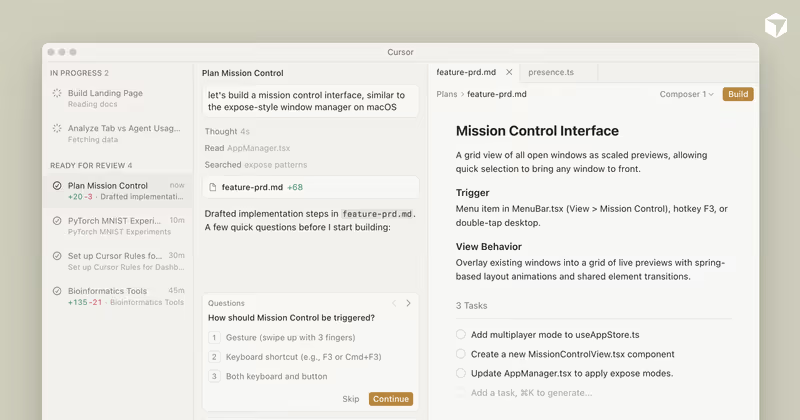
Cursor vs Base44, on screen

cursor.com
Cursor homepage
base44.com
Base44 homepage

The hardest part of building with AI isn't the first draft; it's the rewrite. Taking a vibe-coded prototype to a real, production-ready product forces an immediate Choice: do you prompt-and-iterate on a hosted platform, or do you scaffold the repository and own the code? Base44 and Cursor represent these two opposing choices. One wraps your app in a managed black box, while the other puts a professional software engineering IDE in your hands.

This comparison is judged on transition mechanics. If you start with a conversational concept, the first draft is easy. But taking that app into production involves setting up real database relations, configuring secure user permissions, and ensuring you can change a feature without breaking another. This is where the developer environment and the prompt-driven sandbox part ways.

The audience

Who each one is for

Cursor

  • Professional software engineers who want to build custom web applications twice as fast in their own local IDE.
  • Technical founders who understand React, package configurations, and how to debug code compile errors.
  • Builders who need to work safely within existing, highly complex corporate codebases with compliance requirements.
  • Developers who expect to manually read, verify, and write unit tests for every file the AI generates.

Base44

  • Non-technical operators who want a complete full-stack web application generated from direct, conversational prompts.
  • Makers and agency builders who need to spin up lightweight operational apps with zero server configuration.
  • Product managers who require click-to-tweak interfaces to rapidly update visual layouts without looking at code.
  • Founders seeking to validate an early SaaS MVP quickly using pre-built theme tokens.

Cursor is a professional IDE built for engineers who manage their own code. Base44 is an all-in-one sandbox aimed at business-minded creators who prefer to prompt their way around writing code.

The scope

What you'd build with it

Cursor

  • Production-grade, highly customized enterprise applications where you design and control the underlying system architecture.
  • Legacy code migrations and refactoring tasks across large multi-file repositories using full-project indexing.
  • Custom APIs, specialized scripts, and background services that run on arbitrary cloud infrastructure.
  • What it won't do: Cursor cannot handle turnkey web hosting or database operations out of the box.

Base44

  • Conversational business applications and database-backed directory prototypes with basic logins and roles.
  • Early-stage SaaS MVPs requiring basic user access, file storage, and light CRM operations.
  • Operational dashboards and public directories that don't require complex billing schemas.
  • What it won't do: Base44 cannot build heavy, enterprise-scale backend workloads without hitting LiteLLM latency caps.

Who owns the context window?

In Cursor, yourself is the system architect. Because it is a fork of VS Code, it uses semantic indexing to parse your entire local project structure. When you activate Agent mode in Composer, the AI compiles files, tracks import paths, and writes diffs directly into your repository. However, if a package update breaks a configuration or introduces a syntax bug, you must step in, read the compiler output, and fix it manually. The context window is an accelerator for developers who already have a mental model of their architecture.

Base44 manages the backend plumbing entirely behind the curtain. When you prompt Base44 to change your app, its AI agent modifies both the frontend code and its internal managed PostgreSQL database schema. You do not see the database connection strings, the API route handlers, or the server environment configurations. If the AI hits a bad regression loop, it cannot be manually salvaged with a debugger; you must re-prompt the AI and hope its internal agentic loop finds the fix before you exhaust your plan credits.

Strengths

Where each one is strong

Edge: Cursor

Cursor takes this category because codebase context and terminal integration make it a real tool for professional software engineering.

Cursor

  • Full codebase semantic indexing allows the AI to reference exact imports, types, and logic structures across all local files.
  • Composer Agent mode handles complex, multi-file code editing tasks simultaneously with a visual diff review pane.
  • Compatible with the complete VS Code ecosystem of developer extensions, custom themes, and keybindings.
  • No platform lock-in: you write code on standard frameworks, run things locally, and deploy wherever you want.

Base44

  • Turnkey full-stack generation sets up a live PostgreSQL database, user log-ins, and hosting from a single initial prompt.
  • Discuss mode lets you brainstorm database designs and interface layouts for free without burning message credits.
  • Click-to-tweak design tools allow non-developers to edit text, fonts, and spacing directly on the live interface.
  • Front-end source code can be exported directly to a synced GitHub repository to avoid pure interface lock-in.

Failure modes

Where each one breaks

Edge: Cursor

Cursor's failures are standard developer errors that you can manually resolve. Base44's failures can leave you with an unusable, locked-in frontend.

Cursor

  • High CPU resource usage during codebase indexation can freeze smaller or older developer laptops.
  • Runaway agent edits in Composer mode can silently modify configurations and break environment setups.
  • Opaque rate limit updates have reportedly lowered the value of the base $20/month tier during peak hours.
  • Requires developer expertise to resolve standard package dependency conflicts and terminal compiler bugs.

Base44

  • Unmanaged regression loops can break existing, functional features of your application when prompting for small edits.
  • Backend lock-in traps your custom database tables and routes in their closed environment, preventing clean migrations.
  • SaaS limits on LiteLLM connections introduce API response latency when processing larger datasets or scripts.
  • Default login styling is completely rigid and cannot be customized to fit your company's branding.

Iteration cost

The fix loop, priced

Edge: Cursor

Cursor is much cheaper for complex builds because your local edits don't consume credits.

Cursor

  • Pro plan costs $20/month for 500 fast AI queries, with optional higher tiers available.
  • Real-world burn is low because developers can write, edit, and test code locally without calling the AI.
  • Worst-case scenario involves waiting in a slow-queue tier when you run out of fast prompt queries.
  • Smart auto-complete runs continuously in the background and is unlimited on all paid tiers.

Base44

  • Starter tier is $20/month for 100 message credits, while the Pro tier is $100/month for 500 queries.
  • Real-world burn is high because every visual tweak, bug fix, and database query modification costs credits.
  • Worst-case option is burning hundreds of credits in a prompt loop only to end up with a broken application.
  • Features a dual-credit model where both model prompts and active user database operations consume credits.

Both builders charge for AI iteration, but Cursor lets you exit the loop at any time to edit code manually. On Base44, every single correction costs credits, which can lead to expensive debugging loops.

Exit paths

The code you end up with

Edge: Cursor

Cursor ensures absolute codebase ownership from the very first line generated.

Cursor

  • Standard, clean code repositories with no custom frameworks or hidden backend logic.
  • Zero platform dependencies: your app can be hosted on Vercel, AWS, or your own local machinery.
  • You own your database tables, index definitions, API routes, and user variables completely.
  • Developers inherit a clean ecosystem they can read, refine, and optimize easily.

Base44

  • Front-end source files can be exported to GitHub, but you must pay premium tiers to export the database configuration.
  • The backend API patterns and hosting configurations are proprietary and remain trapped in their systems.
  • Database migrations are incredibly painful because there is no built-in schema export tool.
  • Experienced architecture leads warn against using it for production platforms intended to scale past two years.

When neither wins

If you are starting a business product like a client portal, an internal operations hub, or a secure partner registry, this matchup presents a false dichotomy. Prompting Base44 to build robust user permissions can lead directly to regressions, and coding an entire authentication system from scratch in Cursor is a massive sink of developer time.

For these applications, Softr bypasses the fix-loop entirely. It provides authentication, user roles, and secure databases as visual platform infrastructure, not generated code. You configure who sees what visually, without paying for AI credits to fix a broken login button. It fits perfectly if you want to run your business without managing a custom repository, though you should look elsewhere if you need total brand styling or want to own raw frontend files.

Verdict

Cursor is the winner for developers who want to scale their productivity. Because it works as a standard developer workspace, you retain absolute ownership over your codebase, standard hosting paths, and security architecture. The AI acts as an assistant to speed up your work, but never becomes a dependency that locks you onto a specific vendor platform.

Base44 is only the right choice if you are a non-technical creator who needs a quick prototype and does not have a software engineer on staff. It lets you generate a full-stack mockup with a simple conversational prompt and zero setup, but you must accept backend platform lock-in and a high credit-based price to iterate on your app.

For non-technical builders looking to create secure portals or business directories for real teams, the smartest path is Softr. By treating authentication and database operations as secure platform settings rather than generated AI code, it removes the risk of silent bugs and data leaks from day one.

Q & A

Frequently Asked Questions

Can I export my code from Base44 to host it myself?

You can export the front-end code to GitHub on paid tiers. However, the backend database logic, API routing, and user management remain trapped on their servers, making it incredibly difficult to migrate and self-host elsewhere.

Is Cursor better than Base44 for beginners?

No, because Cursor is a professional IDE designed for software engineers. While Base44 lets you build full-stack interfaces with simple chat prompts, Cursor expects you to run terminal commands, compile code, and manage package installs.

Which tool costs more to iterate on?

Base44 is much more expensive to iterate on due to its credit-based model where every edit and database tweak costs queries. Cursor charges a flat monthly fee for fast queries, and you can edit your project locally for free at any time.

What should non-developers use to build a business portal instead?

They should use Softr because it builds portals and internal interfaces upon structured databases using visual settings instead of generated AI code. This completely avoids the bug regression loops and technical security vulnerabilities common with AI builders.