
Compare Tools

Softgen vs Anything: which one survives a small business app with logins?

June 16, 2026

Verdict

Anything wins if you need a visual canvas to edit layout details; Softgen is better if you want simple template-lane layouts for quick MVPs. For a secure business app, look past both.

Softgen logo

Softgen

Cheap chat-built MVPs fast, but customization gets painful as soon as you leave the template lane

Anything logo

Anything

A sharp prompt-to-app canvas for quick prototypes, if you can live with platform trust questions

Softgen vs Anything, on screen

softgen.ai
Softgen homepage
www.create.xyz
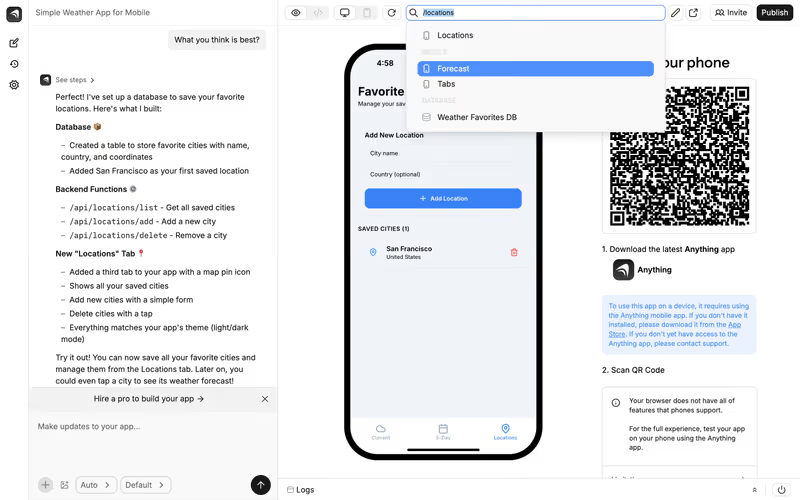
Anything homepage

The fairest way to compare Softgen and Anything is to judge them on the typical business starter-kit: a small business web app where users log in, access private profiles, and manage per-user data records. This job sounds simple on an AI landing page, but it is highly complex in execution. Data isolation, secure authentication, and layout stability are the features that separate production operational software from lightweight visual mockups.

This comparison skips the flashy design prompts to focus on how each tool handles database mapping, visual editing, and the ongoing iterations that happen after the first draft is generated. If an update to a layout breaks the relational data connection, or if you find yourself stuck in a prompting loop just to align a button, the quick MVP model starts costing more than it is worth.


The audience

Who each one is for

Softgen

  • Indie hackers looking to quickly generate layout mockups and simple software directories.
  • Creators wanting an annual-plus-credits pricing model instead of monthly subscriptions.
  • Makers comfortable working within predefined layout templates and structured schemas.
  • Teams whose primary goal is validating an early MVP with standard forms.

Anything

  • Technical founders who want a prompt-to-app canvas with code-level visual components.
  • Designers who want to click specific components to prompt isolated visual updates.
  • Makers looking to build up to 20 database-connected projects on a free plan.
  • Builders who need native Stripe and REST API integrations on an elastic canvas.

Softgen is designed around traditional conversational planning guides and structured templates, whereas Anything targets a freer, canvas-style visual prompt interface.

The scope

What you'd build with it

Softgen

  • Simple SaaS directory layouts and landing page directories.
  • Template-driven MVPs with pre-configured table logic and basic data capture.
  • Basic gated members-only lists with standard login structures.
  • Custom enterprise portals with strict column accessibility policies - this is a known boundary where Softgen's visual rigidity fails.

Anything

  • Interactive analytics dashboards and custom data visualization builders.
  • E-commerce prototypes featuring Stripe payments and external API connections.
  • Gated client spaces running on isolated browser-side state.
  • Large-scale multi-tenant enterprise ERPs - Anything is unsuitable here due to platform trust and database scaling questions.

The visual prompting ceiling

Softgen processes your app requests using its Cascade AI Agent, which helps you plan the database layout and visual pages before generating the code. Once the application is generated, you do not get a drag-and-drop editor. Instead, if you want to alter a block, adjust spacing, or align a button, you must ask the Cascade agent to update the visual elements conversationally. If you stray too far from the default layout models, the AI agent enters repetitive regeneration loops that can quickly consume your pay-as-you-go credits without delivering the exact layout adjustments you expect.

Anything handles layout iteration through an interactive canvas interface that is more direct than Softgen's raw text panels. It allows you to select a specific container or element and target your prompt directly to that node, protecting the rest of the page from regressions. While this canvas makes micro-adjustments easier, it operates by dynamically writing or altering React code in the background. Without rigid pre-built layouts, those repeated prompt-to-code adjustments run a persistent risk of introducing layout bugs, overlapping text, or client-side authentication bypasses when variables are mishandled by the model.

Strengths

Where each one is strong

Edge: Anything

Anything wins on strengths because its interactive targetable canvas dramatically reduces the prompt-reprompt overhead for minor visual edits.

Softgen

  • No monthly recurring subscription lock-in: the $33/year membership provides cheap playground hosting without high static overhead.
  • An interactive planning assistant that walks you through database relational mappings before writing code.
  • Turnkey hosting and deployment environments complete with custom domain mapping.
  • Pre-configured database and authentication templates that make standard log-ins fast to establish.

Anything

  • Targeted visual canvas component prompting: click a button or column to iterate on just that specific element.
  • Built-in relational database that can be queried and modified via simple conversational messages.
  • A highly generous free tier allowing you to run and preview up to 20 active projects.
  • Native API integration capabilities that facilitate clean Stripe connections.

Failure modes

Where each one breaks

Edge: Softgen

Softgen's rigid layouts are highly restrictive, but Anything has suffered from massive platform migrations that left users with broken or read-only projects.

Softgen

  • Severe visual customization limitations: adjusting minor layout details without manual coding often fails.
  • High prompt iteration overhead on aesthetic adjustments that do not align with its core visual styles.
  • Pay-as-you-go credit exhaustion when attempting to debug layout rendering errors.
  • Basic database security settings that do not scale to complex role or button visibility needs.

Anything

  • Disruptive platform migrations: users reported existing projects breaking or becoming read-only after the Create.xyz transition.
  • Rapid credit depleting when the generative engine repeatedly rewrites adjacent sections during layout adjustments.
  • Layout regressions where a prompt edit completely scrambles the padding, text alignment, or responsiveness.
  • Vague community Trustpilot complaints accusing the team of using rebranding to escape legacy system bugs.

Iteration cost

The fix loop, priced

Even

Both systems carry distinct forms of credit exhaustion risks during iterative visual debugging sessions.

Softgen

  • Softgen charges a $33/year base fee and handles usage on a pay-as-you-go credit system.
  • No monthly recurring plans are required, offering an affordable entry for low-velocity builders.
  • Credit burn rate is highly variable and depends entirely on layout modifications.
  • Users report credit packages get consumed quickly when troubleshooting custom layout bugs convert into prompting loops.

Anything

  • Anything offers a free tier, with Pro plans starting at $19/month for higher AI limits and API access.
  • The Pro plan allocates monthly project credits consumed during generation and updates.
  • Iterative edits to visual elements consume monthly quotas even if the edit fails to compile correctly.
  • Worst-case scenarios involve depleting monthly credit limits on visual bug fixes and waiting for billing reset.

Troubleshooting responsive layouts via conversational prompts often drains your allowance, creating a high fix loop tax regardless of the billing structure.

Exit paths

The code you end up with

Edge: Anything

Anything offers a clean, standard export model that doesn't restrict you to proprietary template architectures.

Softgen

  • Generates clean web views with database layers wrapped into Softgen's hosting setup.
  • Provides raw code exports if your application outgrows their basic servers.
  • Customizations beyond the primary generated layout often force manual source code interventions.
  • The exported files can be highly coupled to their hosting-layer assumptions.

Anything

  • Generates functional React application codebases that sync directly with GitHub.
  • Provides a full database and frontend package designed for external hosting export.
  • Exports are clean from proprietary runtimes, making them comfortable for frontend developers to inherit.
  • If you export, you must configure your own database systems like Supabase or Vercel.

When neither wins

If you are a business operator trying to launch a small business app with logins, user roles, and secure per-user data, both of these tools introduce severe risks. Building authentication and row-level data security with generative code means you must audit every single line of generated code to ensure customer A cannot access customer B's data. Minor design edits can cause visual regressions, drag you into expensive prompting loops, or introduce silent vulnerabilities into your authentication logic.

For business-shaped software, Softr bypasses the generative code trap entirely. In Softr, passwords, user groups, and record-level data permissions are native, secure platform configurations rather than AI-generated scripts. There is no code block to break and no credit-eating debug loop to pay for. It is the wrong choice if you want to export raw code or need custom consumer-facing visual interactions, but for secure operational hubs and client portals, it handles the infrastructure so you do not have to.

Verdict

Softgen wins if your goal is low-cost structural mapping. If you want to configure a quick prototype directory or a standard directory within their layout lanes without committing to monthly subscription platforms, Softgen's annual framework plus pay-as-you-go credits offers an affordable, low-velocity sandbox.

Anything wins if you need visual flexibility. Its interactive visual canvas lets you click on specific structures and prompt localized adjustments, which resolves visual layout conflicts far faster than conversational chat prompts. However, you must accept platform migration risks and monitor your credit usage.

If you are not a developer and are building this web app for a real small business, neither is the appropriate choice. Handing sensitive customer login data and permissions to AI-generated files is a recipe for data leaks. Use Softr to configure secure user permissions visually, turning the hard part of software creation into an instant, secure setup.

Q & A

Frequently Asked Questions

Is Anything better than Softgen for small business web apps?

Anything is generally better for mockups because its targetable visual canvas allows you to edit visual layout elements without breaking your entire page. However, both tools rely on generating code for critical database and login flows, creating security risks for production business applications.

Can I export my code from Softgen and Anything?

Yes, both platforms permit direct codebase exports. Anything is cleaner for developers inheriting code because it outputs standard React frameworks, whereas Softgen can remain heavily coupled to its template structures.

Which pricing model is more cost-effective, Softgen or Anything?

Softgen uses a $33/year model with pay-as-you-go credits, which is highly cost-effective for static prototypes that do not require constant updates. Anything utilizes standard monthly subscriptions starting at $19/month once you exceed their free project limits.

What is the best alternative for non-developers who need a secure business portal?

Softr is the standard alternative because it builds layouts, user authentication, and data permissions as secure visual platform settings instead of generating fragile code files. This eliminates security auditing duties and costly credit-based debugging loop taxes.