Compare Tools

Cursor vs Replit: which is better for taking a prototype to a real product?

June 16, 2026

Verdict

Cursor wins if you must own, custom-host, and inspect every line of your codebase; Replit wins if you want to prompt-and-iterate with an autonomous agent handling database migrations and live cloud deployments.

Cursor logo

Cursor

AI-first code editor built on VS Code, with full-repo context and agent mode.

Replit logo

Replit

Cloud IDE with an autonomous agent that builds, tests, and deploys apps.

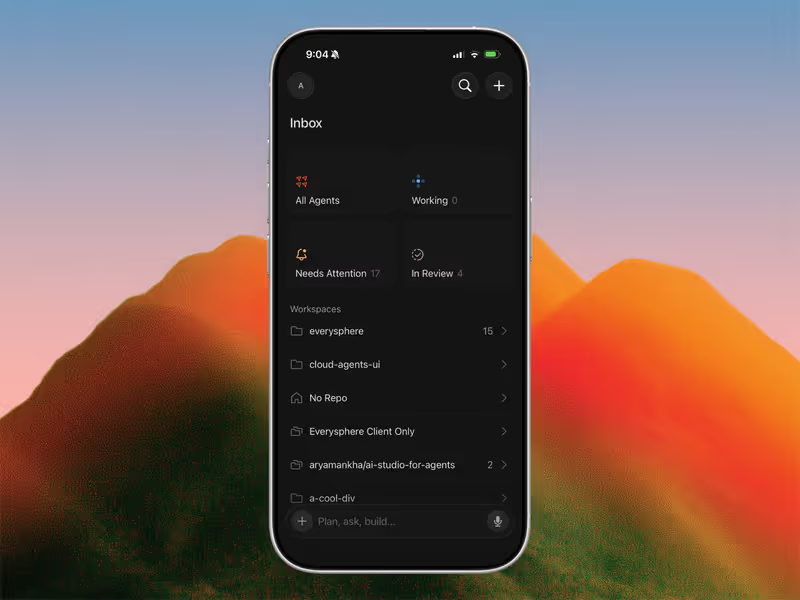
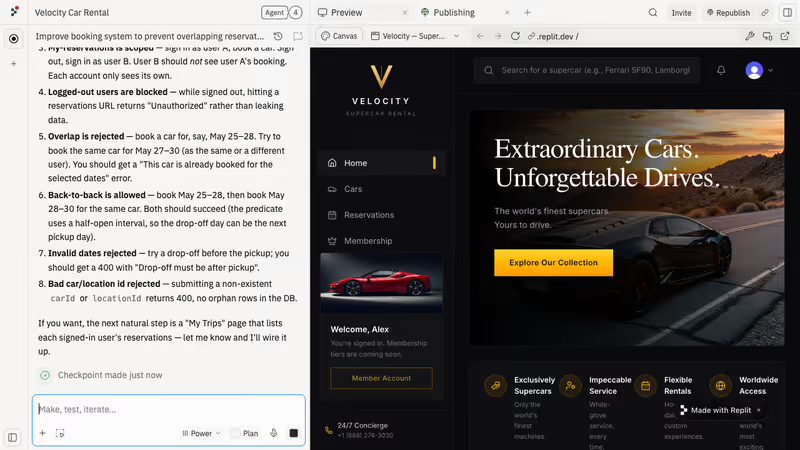
Cursor vs Replit, on screen

cursor.com
Cursor homepage
replit.com
Replit homepage

The journey of taking a vibe-coded prototype to a real product highlights the deep divide between prompt-and-iterate and scaffold-and-own development. In this comparison, we evaluate these two paradigms using a concrete job: taking a chaotic, single-prompt proof-of-concept and hardening it into a secure, production-grade application that has database safety, user authentication, and reliable hosting. While both tools are designed to work with code, they diverge on whether you should manage the underlying infrastructure or delegate it to an autonomous cloud environment.

This transition from prototype to production is where the real developer work happens, exposing fragile database schemas, environment variable mismatches, and runaway API credit spending. Choosing the wrong tool means either spending hours setting up local configuration plumbing when you want to vibe, or dealing with an agent that silently rewrites your dependencies and introduces subtle loops in your code.

The audience

Who each one is for

Cursor

  • Professional software engineers who need absolute control over their local environment, package versions, and hosting targets.
  • Technical founders with existing codebases looking to accelerate refactoring with semantic search and full-repo indexing.
  • Experienced developers who want an IDE that integrates deeply with their local terminals and custom Docker systems.
  • Teams where code quality, compliance, and strict code review are mandatory before any public deployment.

Replit

  • Product-focused builders who want to describe an app in natural language and have an agent code, test, and deploy it.
  • Non-technical founders who want to take a prototype to a live URL without installing local developer dependencies.
  • Solo developers seeking a fast sandbox with a managed cloud database and instant, one-click hosting.
  • Educators and collaborative teams who need browser-based multiplayer coding sessions with minimal environment friction.

Cursor assumes you are a developer who lives in a local IDE and owns your environment; Replit is designed for builders who want the cloud workspace and an autonomous agent to handle the server plumbing.

The scope

What you'd build with it

Cursor

  • Enterprise-scale software where codebase indexing, refactoring legacy files, and writing unit tests are the primary developer tasks.
  • Custom web applications that must run on specific corporate private servers or integrate with advanced local database configurations.
  • Complex backend APIs and scripts that require deep semantic understanding of multiple local repositories.
  • Mobile-only target apps: Cursor is a general IDE, but it does not package and host web apps as instant cloud deployments.

Replit

  • Full-stack web applications scaffolded from scratch using Replit Agent, running on a managed cloud database layer.
  • Interactive SaaS MVPs, Slack bots, and background automation tasks generated entirely with browser-based conversational design.
  • Collaborative classroom coding projects and live multiplayer hackathon prototypes that run instantly on subdomains.
  • Large-scale commercial enterprise apps with massive databases: Replit contains compute, scaling, and credit constraints that complicate heavy enterprise workloads.

Who owns the context window

The choice between Cursor and Replit is a choice of where the editor's brain lives. Cursor runs locally on your machine, leveraging full-project indexing to feed files and symbols into your chosen model. When you use Cursor Composer or Agent mode, it interacts with your local filesystem via a git-friendly model. You can see every file change, reject lines before they hit the disk, and run local compilers to check the code. Cursor does not know where you host your code or what database you run; it simply processes text based on deep codebase awareness and lets you manage the infrastructure.

Replit completely controls the workspace container, keeping everything in a remote virtual machine. Replit Agent uses this environment to autonomously run, test, and correct its own code inside the workspace. When the agent builds a PostgreSQL schema, it handles migrations, installs npm packages, runs reflection loops, and deploys directly to production on <app>.replit.app. This browser-first containerization setup gives the agent total agency, but it also means the builder is dependent on Replit's runtime, VM stability, and cloud compute limits to keep the application alive.

Strengths

Where each one is strong

Edge: Cursor

Cursor wins on developer precision, giving engineers full file context and git control without forcing them into a proprietary web container.

Cursor

  • Full-repo indexing and semantic search that maps your entire local workspace, allowing models to accurately reference existing logic.
  • Direct integration with standard VS Code themes, configuration settings, and the entire VS Code extension registry.
  • Developer-first privacy settings that prevent your custom codebase from being used in AI model training.
  • Zero platform lock-in: you write code on your drive, and you can deploy it to Vercel, AWS, or Railway without billing dependencies.

Replit

  • Autonomous agent scaffolding that configures database structure, sets up API keys, and deploys web apps in single browser tabs.
  • Zero-setup environment allowing multiplayer real-time collaborative coding sessions with shared cursors and billing teams.
  • Built-in managed database layer that automatically handles PostgreSQL migrations and database schemas via simple natural language.
  • One-click deployments with automatic SSL certificates and runtime resource scaling directly within the cloud console.

Failure modes

Where each one breaks

Edge: Cursor

Cursor's failures are typically standard developer problems; Replit's failures involve infinite agent loops that burn real dollars in minutes.

Cursor

  • High CPU indexing lag where large, unoptimized repositories freeze the interface and exhaust local laptop RAM resources.
  • Unintended changes across multiple files when using Cursor Composer, requiring manual git rollbacks and careful diff inspections.
  • No built-in database layer or hosting, forcing you to manually configure databases like Supabase or coordinate server environments.
  • Opaque fast-query limits that slow queries down to several minutes once your monthly limit has been exceeded.

Replit

  • Infinite bug-generation loops where the agent repeatedly cycles trying to fix helper packages it broke itself, burning through your tokens.
  • Unexpected billing overages caused by massive database checkpoint backups and auto-migrations scheduled by the agent.
  • Weaker context model throttling on standard plans that forces mistakes, leading to circular runs and faked success reports.
  • Catastrophic data loss when giving autonomous agents complete write access to live production database environments.

Iteration cost

The fix loop, priced

Edge: Cursor

Cursor features flat monthly billing that prevents unexpected overage surprises during heavy debugging iterations.

Cursor

  • Hobby starts at $0 with 50 fast queries; Pro plan is $20/month for 500 fast queries.
  • Pro+ plan is $60/month with 1,500 fast queries for heavy, ongoing codebase edits.
  • Slashed query limits after fast-limit consumption render the editor slow but still functional without extra costs.
  • Unused fast query credits do not rollover into the next month's billing cycle.

Replit

  • Replit Pro plan is $100/month (or $95/month billed annually) and includes $100 in credits.
  • AI runs are effort-priced based on agent task runtime, not on flat prompt counts.
  • Users report burning through $5 in ten minutes, or over $350 in a single day during debugging iterations.
  • Unused credit overages roll over for up to one month only on active paid plans.

When you are stuck in a debugging cycle, you are forced to pay for the AI's mistakes. Running these fixes iteratively is where developers pay the true fix loop tax.

Exit paths

The code you end up with

Edge: Cursor

Cursor's local editor outputs standard projects that remain entirely yours, without proprietary container lock-in.

Cursor

  • Standard multi-language code stored on your local drive with fully readable file architecture.
  • Absolute portability with git, letting you walk away to any editor or host of your choosing.
  • Custom code patterns that are standard and clean, with no proprietary API abstractions.
  • You are entirely responsible for the security of your database structures and production API keys.

Replit

  • Fully packaged workspaces deployed securely onto <your-app>.replit.app or custom domains.
  • Managed database structure that you can export, though users complain about platform-specific migrations.
  • Potential dependencies on Replit's specific cloud container formats that complicate raw local export.
  • Technical technical-debt buildup if the agent generates duplicate utility functions across hidden directories.

When neither wins

This matchup is developer-shaped. Cursor and Replit both assume you are building software that lives in a raw, custom-coded repository - whether you edit those files manually or have an autonomous agent manage the container. Neither of these approaches is suited for business users who want to build stable internal software without maintaining a backend codebase.

If you want to bypass developer environments entirely, Softr handles databases, user groups, and granular permissions as platform infrastructure, eliminating code-level vulnerabilities, hosting headaches, and the technical debt of vibe coding.

Verdict

Cursor is the winner for taking prototypes to product if you are a developer, or if you plan to hire one. Because it is a local, professional IDE, the output remains standard, clean, and completely under your control. By using Cursor's codebase indexing, you maintain absolute ownership over your local git repository, avoiding proprietary container hosting fee structures and the risk of runaway background agent billing.

Replit is the right pick if you are looking to learn programming or want to run rapid, conversational experiments where an autonomous agent handles the underlying container. Replit's multiplayer collaboration and instant, browser-based deployment targets are unmatched for collaborative prototypes, provided you budget for credit burn and monitor the agent to avoid circular bug-fixing loops.

If your goal is to build secure, production business software (like client dashboards or databases portals) without owning and maintaining raw code, turn away from the IDE. A dedicated no-code platform like Softr lets you configure auth and databases visually, shipping apps securely without paying for the AI debugging tax.

Q & A

Frequently Asked Questions

Is Cursor better than Replit for building client apps?

Yes, if you want full control over your project architecture and want to export or self-host your code without being locked into a proprietary web container. Replit has a stronger autonomous agent, but its container limits and credit billing make it harder to manage for production-grade, long-term products.

Can I export my code from Replit?

Yes, you can export your workspace files and download your code to run locally. However, Replit's managed cloud database migrations and environmental secrets are bound to its container platform, meaning porting to another hosting setup requires manual web developer plumbing.

Which costs more to iterate on, Cursor or Replit?

Replit costs significantly more because its agent efforts are priced dynamically based on complex runtimes. While Cursor costs a flat $20 to $60 per month, Replit builders report spending hundreds of dollars in a single day during infinite agent bug-fixing loops.

What is the best alternative for building business portals without coding?

If you do not want to manage raw code or pay for AI debugging loops, Softr is the best alternative. It handles authentication, secure data display, and user management as visual platform infrastructure, keeping your data safe out of the box.

