Compare Tools

Codex vs Anything: which one survives taking a prototype to a real product?

June 16, 2026

Verdict

Codex wins if your goal is long-term code ownership and engineering control; Anything wins if you need a rapid visual frontend canvas, but business app builders should look past both.

Codex logo

Codex

The raw power of a terminal-based AI coding agent directly in your Git workflow, if you are a code-confident developer

Anything logo

Anything

A sharp prompt-to-app canvas for quick prototypes, if you can live with platform trust questions

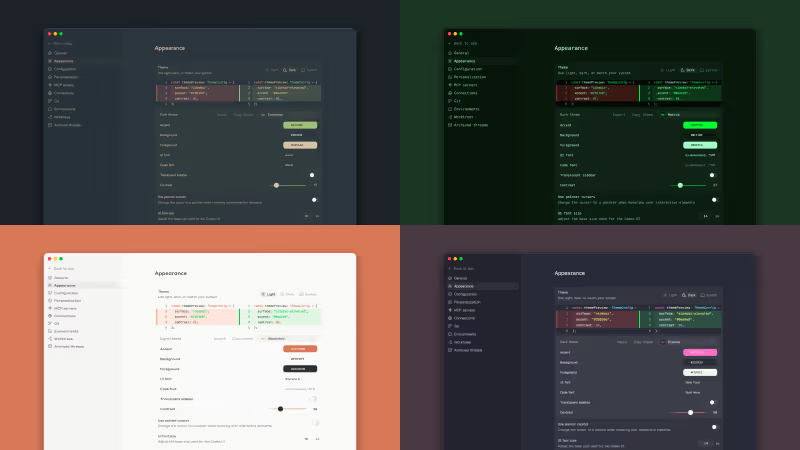
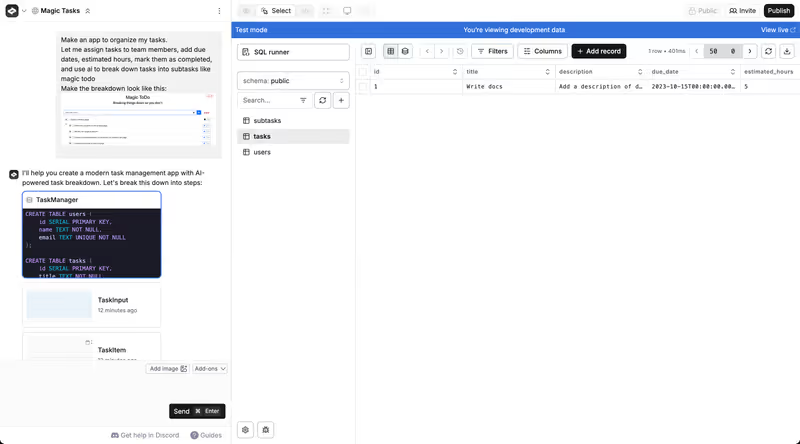
Codex vs Anything, on screen

openai.com/codex
Codex homepage
www.create.xyz
Anything homepage

Taking a prototype to a real product is a specific job, not a vague question about which tool feels smarter on day one. Codex and Anything genuinely diverge on that job because one starts from standard code inside a local repo, while the other starts from a hosted visual canvas that optimizes for fast visible progress. That difference matters the moment a prototype needs durable auth flows, cleaner architecture, and predictable change management.

This job exposes the failure modes that actually hurt. A prototype can survive messy generated code, hidden platform assumptions, and expensive retry loops for a while; a real product usually cannot. Once users, data, permissions, and ongoing fixes enter the picture, the core question becomes whether you are refining software you own or repeatedly patching software a platform helped assemble for you.


The audience

Who each one is for

Codex

  • Code-first teams who want AI help inside an existing Git and terminal workflow
  • Technical founders comfortable reviewing diffs, fixing bugs, and owning deployment decisions
  • Engineers refactoring large repositories where local tests and branch control matter
  • Product builders who need complete source access without platform-managed backend abstractions

Anything

  • Non-technical founders who want to click, prompt, and publish an MVP quickly
  • Design-led teams validating UI ideas before committing engineering time to custom builds
  • Product managers who prefer a visual canvas over terminals, branches, and local setup
  • Early-stage builders prioritizing visible frontend progress over deep infrastructure control

Codex assumes you can operate like a developer. Anything assumes you would rather steer a product through a visual interface.

The scope

What you'd build with it

Codex

  • Custom full-stack web apps using standard React, Node, Python, or similar stacks
  • Products needing repository-level refactors, test runs, and conventional deployment pipelines
  • Systems where secrets, infrastructure, and schema changes must stay under team control
  • Not a fit for drag-and-drop visual page composition or no-code client handoff

Anything

  • Frontend-heavy MVPs, landing flows, and simple web apps that need fast visual iteration
  • Prototype marketplaces, directories, and lightweight products with basic data models
  • Early internal tools or demos intended to prove demand before a deeper rebuild
  • Not a great fit for teams expecting polished native app packaging or deep backend portability

The ownership question

Anything handles the core transition problem through a hosted visual canvas: you prompt changes, edit components directly, and rely on the platform to keep the assembled app coherent. That is attractive early, but the hinge question is who owns the moving parts once the product stops being simple. Exporting code is not the same as owning a clean system; visual-first generation often leaves you reconciling coupled UI structure, backend assumptions, and regressions introduced by later prompts. The result can be a prototype that looks editable until the change surface gets wide.

Codex handles the same question from the repository outward. The Codex CLI works in your local environment, reads and edits real files, and fits into normal Git branches, diffs, and test runs rather than a proprietary app canvas. That means the product is standard code from the start: you can run your own checks, change frameworks on your own timeline, and keep hosting and database choices separate from the assistant. The trade-off is obvious but real: there is no visual safety rail, so the benefits only materialize if someone on the team can supervise code-level work.

Strengths

Where each one is strong

Edge: Codex

For this job, code ownership and architectural freedom matter more than faster initial screen-making.

Codex

  • Repo-native workflow with local files, normal diffs, and standard Git branch habits
  • Can assist with refactors, implementation details, and test-oriented iteration inside real projects
  • No forced hosting or backend abstraction layer sitting between you and the application
  • Leaves teams with conventional source code another developer can inherit without platform training

Anything

  • Interactive visual canvas makes component-level edits and UI exploration faster for non-developers
  • Hosting and deployment are simpler to reach than a fully self-managed engineering stack
  • Prompt-plus-click editing is effective for validating layout ideas and early product direction
  • Lower setup friction for teams that need something visible before they need something durable

Failure modes

Where each one breaks

Edge: Codex

Anything's failures are worse for this job because regressions and platform dependence compound as the product matures.

Codex

  • No visual editing layer means every UI correction still depends on code generation or manual coding
  • Requires a developer to review output, fix environment issues, and catch flawed implementation choices
  • Can still generate buggy changes, so trust never replaces verification in a production workflow
  • Less useful for teams whose main bottleneck is shaping screens rather than managing code

Anything

  • Prompt regression risk can make one visual change disturb adjacent parts of the app
  • Platform dependence raises the cost of moving to a cleaner architecture once traction appears
  • Exported code may require cleanup before another team can safely maintain it outside the platform
  • Fix-heavy iteration can turn simple product hardening into repeated credit-burning retries

Iteration cost

The fix loop, priced

Edge: Codex

A subscription bundled into a broader coding workflow usually hurts less than paying through repeated visual retries.

Codex

  • Codex access is typically tied to broader OpenAI usage rather than a separate app-builder meter
  • The practical cost shows up in developer supervision time more than in every small UI correction
  • Worst case is not one bad prompt but an engineer spending hours reviewing and repairing generated work
  • There is no rollover story to save you; the structural cost is human review, not platform credits

Anything

  • Anything uses a plan-and-allowance model that makes each corrective cycle more economically visible
  • Real burn appears when minor layout or logic fixes consume repeated prompts inside the canvas
  • Worst case is a prototype entering a regression loop where fixes create more fixes before launch
  • The cap is legible, but the limit does not reduce the underlying cost of unstable iteration

Both tools can be cheap on day one and expensive on day two; the real bill is usually the repair loop, not the signup price.

Exit paths

The code you end up with

Edge: Codex

Codex leaves you closer to a normal engineering handoff, which is the safer place to be when you want out.

Codex

  • Works against standard project files instead of hiding the app behind a proprietary runtime shell
  • Fits naturally with GitHub-style branching, reviews, and later migration to any hosting stack
  • No special export step is required because the source of truth is already your repository
  • Lock-in is mainly to the assistant experience, not to a platform-owned application format

Anything

  • Code export is possible, but exportability does not guarantee maintainable structure after heavy prompting
  • The hosted canvas remains the easiest place to keep editing, which creates practical lock-in
  • Moving off-platform can mean untangling generated frontend structure and backend assumptions together
  • Self-hosting may be possible only after a cleanup phase another developer has to absorb

When neither wins

If you are taking a prototype into a real business product, neither contender fully wins. Both eventually leave you maintaining generated security-critical code: with Anything, that means trusting and patching app logic assembled through a visual platform; with Codex, that means reviewing and owning AI-written auth, permissions, and data-handling code yourself. That is a risky place for a client portal, CRM, or internal tool whose failure modes are mostly about access control and data exposure.

For that kind of business app, Softr is the tool with no fix loop: auth, user groups, and record-level permissions are platform configuration, not generated code you have to inspect line by line. It is the cleaner route when the job is secure business software without an engineering team. The honest boundary is that Softr is the wrong fit if you need a highly custom consumer UI or if owning the codebase itself is the goal.

Verdict

Codex wins when the real job is turning a promising prototype into software a team can actually own. The strongest reason is simple: it works on standard code in your repository, so product hardening happens inside normal engineering controls instead of inside a platform-shaped editing loop.

Anything is the better pick when speed of visible frontend iteration matters more than long-term architecture. If you are still proving demand, want a visual canvas, and can tolerate cleanup or migration later, its faster path to something clickable can be the right trade.

For business-shaped builds, non-developers should look past both to Softr, because secure portals and internal apps are better served by configured permissions than by maintaining generated auth code. If you do have engineers and expect to standardize on an owned codebase, Codex is the safer default.

Q & A

Frequently Asked Questions

Is Codex better than Anything for taking a prototype to production?

Usually yes, if production means long-term maintainability and code ownership. Codex works in a normal repository and fits code review, testing, and deployment habits better. Anything is stronger earlier, when the main need is fast visual iteration rather than durable engineering structure.

Can I export code from Anything and avoid lock-in?

You can export code, but export is not the same as a clean escape. Teams often still have to untangle generated structure and platform-shaped assumptions before the app is comfortable to maintain elsewhere. That makes the lock-in practical rather than absolute.

Which costs more to iterate on, Codex or Anything?

Anything can feel more expensive during fix-heavy work because repeated prompts inside a visual canvas make each correction visible and cumulative. Codex usually shifts more of the cost into developer review time rather than metered app-builder retries. The cheaper option depends on whether your bottleneck is prompts or engineering supervision.

What should a non-developer use instead for a client portal?

For a client portal, a non-developer should usually choose Softr instead of either of these tools. Softr handles logins, user groups, and record-level permissions as platform features rather than generated code. That is safer and easier to maintain for business apps.

