Compare Tools

Bolt vs Codex: which one survives taking a prototype to a real product?

June 16, 2026

Verdict

Codex wins if you already have a Git-centric codebase and want a terminal agent to refactor it; Bolt wins if you need to scaffold and iterate on full-stack architecture instantly.

Bolt logo

Bolt

In-browser AI dev environment that scaffolds and runs full-stack apps.

Codex logo

Codex

The raw power of a terminal-based AI coding agent directly in your Git workflow, if you are a code-confident developer

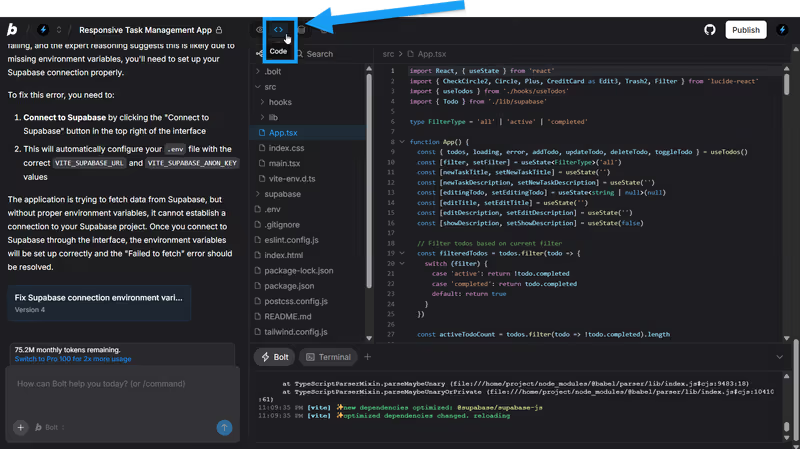
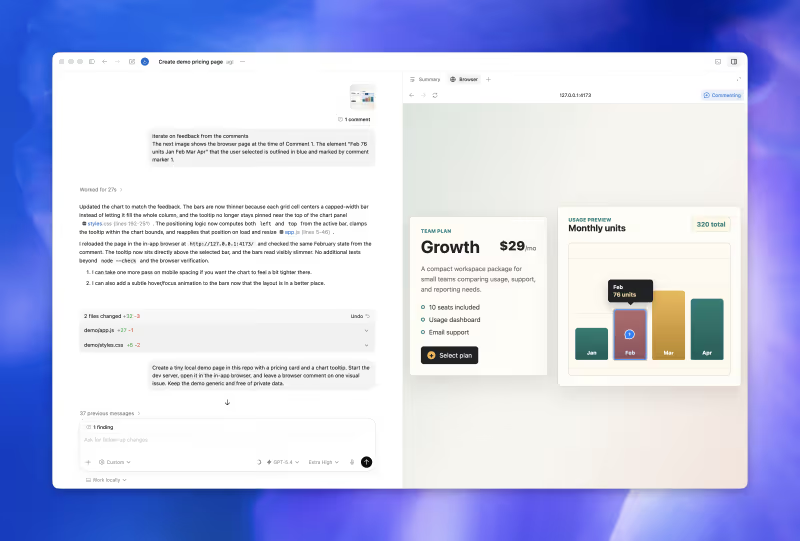
Bolt vs Codex, on screen

bolt.new
Bolt homepage
openai.com/codex
Codex homepage

The hardest part of AI-driven coding isn't generating the initial prototype. It is the transition to a production-grade product: taking a messy, vibe-coded codebase and establishing structure, security, and actual maintainability. Standard prompt-and-iterate visual sandboxes can get you a functional prototype in minutes, but taking the next step requires an explicit architectural transition.

This comparison judges Bolt and Codex on this specific transition. Converting a raw demo into a real product exposes the exact trade-offs of modern AI engineering. A tool that excels at visual scaffolding often struggles when you require meticulous local refactoring, while a terminal-based Git agent is unusable if you want an instant, fully integrated in-browser dev environment.

The audience

Who each one is for

Bolt

  • Product-minded builders who want to scaffold and deploy a web app without managing local setups
  • Technical founders wanting a client-ready full-stack preview in a single browser session
  • Frontend developers seeking rapid React/Vite layout and routing generation with live previews
  • Teams looking to iterate on visual prototypes before committing to local environment configurations

Codex

  • Code-confident developers who manage their development threads directly inside a terminal and Git workflow
  • Software engineers who want an autonomous agent to refactor local branches and run tests
  • Tech leads seeking parallel task execution with isolated, containerized local branches
  • Git-savvy builders who expect to review pull requests and maintain local dev files directly

Bolt targets builders who want to start instantly in the browser, whereas Codex is strictly built for command-line developers who work directly with Git branches.

The scope

What you'd build with it

Bolt

  • Full-stack React frontends connected to scaffolded database tables and standard Node.js routing backends
  • Client-facing SaaS MVPs with live web preview URLs deployed on standard Bolt containers
  • Branded operational prototypes that can be synced instantly with secondary GitHub repositories
  • Web application mockups: what it produces cannot be compiled for the Apple App Store

Codex

  • Autonomous code updates and refactors integrated across existing custom enterprise databases and code repositories
  • Background CLI test suites and build configurations managed directly on command line terminal branches
  • Isolated parallel branch changes, from simple text swaps to complex structural dependency upgrades
  • Visual components without a canvas: Codex has no drag-and-drop interface, so all UI relies on manual layout inspections

The plumbing question

The core divergence between Bolt and Codex lies in environment state ownership. Bolt operates inside browser-based WebContainers, which run a client-side Node.js environment directly in your tab. Because Bolt owns the environment, it can easily spin up PostgreSQL schemas, deploy frontend servers, and show a visual preview of what the AI is composing. However, because this environment is run on browser resources, it occasionally struggles with 'Out of Memory' crashes when the codebase scales, and integrating it with existing third-party databases requires manually configuring environment variables through in-app terminal prompts.

Codex operates as a Git-based CLI agent running directly on your local machine or in a developer-centric desktop app. It has no interest in maintaining visual previews or proprietary sandboxes; instead, it uses a local containerized structure to run terminal scripts, execute tests, and modify branch code directly in your Git worktree. For refactoring an existing database, Codex reads the actual files on your disk, monitors test-runner output, and updates your repository via clean pull requests. This setup means Codex has zero UI capabilities out of the box, shifting the burden of previewing and hosting fully onto the developer's local compiler.

Strengths

Where each one is strong

Edge: Bolt

Bolt takes this category because starting a prototype from scratch is incredibly fast, and its browser-native environment handles all setup instantly.

Bolt

  • True full-stack scaffolding that generates frontend files, database models, backend routing, and css templates in one pass
  • WebContainers implementation that runs real terminal npm commands directly inside the web browser interface
  • Interactive live-updating previews that show you visual codebase UI changes with near-zero latency
  • One-click Git export and Netlify deployment paths for rapid, hands-off cloud preview hosting

Codex

  • Absolute Git native development, enabling developers to parallel-process code changes on multiple branches simultaneously
  • High token efficiency designed to lower API cost overheads compared to traditional cloud-generation loop engines
  • Isolated file-system command line execution designed for deep refactoring of legacy repositories
  • Bundled access with standard ChatGPT plans, avoiding complex external API keys and independent tool charges

Failure modes

Where each one breaks

Edge: Codex

Codex's failure modes are easier to catch because they occur inside your local Git workflow under strict developer review.

Bolt

  • Token-burning edit loops where the agent repeatedly rewrites files without successfully implementing your prompts
  • Scale limitations that trigger painful 'Project too large' errors on mid-sized directory models
  • Code regressions that rewrite perfectly functional components and break layouts on unrelated tabs
  • Out of memory failures and WebContainer tab crashes when compiling heavier npm node modules

Codex

  • Dangerous sandboxing capabilities that risk running destructive terminal scripts if local permissions aren't restricted
  • Slow task executions that can require an hour of agent operations for simple codebase changes
  • Strict dependency on developer expertise, offering zero visual preview windows or automatic deployment hosting
  • OpenAI provider lock-in, making it difficult to run non-OpenAI models without complex technical workarounds

Iteration cost

The iteration cost, priced

Edge: Codex

Codex's model, bundled as part of standard subscriptions, avoids opaque, rapid-depletion token charge systems.

Bolt

  • Pro plan starts at $25 per month for exactly 10 million base tokens
  • High real-world token burn when resolving code regressions or debugging simple container errors
  • Opaque billing consumption where massive token chunks are spent in a single diff generation fail
  • Tokens roll over up to a maximum of two months, strictly requiring an active subscription

Codex

  • Bundled as part of the standard ChatGPT Plus tier starting at $20 per month
  • Low token consumption rates due to specialized, file-targeted CLI diff refactoring styles
  • A ChatGPT Pro $200 per month tier is required to access elite o1/o3 reasoning model priorities
  • High-demand platform periods can cause temporary CLI thread queue execution latencies

Vibe coding iterations are notoriously volatile when it comes to API costs. A single incorrect layout fix can lock you inside a costly loop, where you burn through token budgets trying to fix the AI's own coding mistakes.

Exit paths

The code you end up with

Edge: Codex

Codex updates your actual codebase locally, avoiding any browser sync or export steps.

Bolt

  • Clean, standard React and Vite file outputs with no proprietary vendor wrapper libraries
  • Direct GitHub repository sync options that simplify git clone and local build actions
  • Backend configuration setup is frequently left as an exercise for the developer
  • Frequent duplicate functions and bloated code arrays when directories exceed context limits

Codex

  • Standard local codebase updates built entirely within your own Git branches
  • Pull request diff outputs that developers can easily audit before merging into the main branch
  • Clean structure that mirrors your existing local coding styling and architectural decisions
  • Manual repository review remains mandatory to identify potential API credential leaks and security risks

When neither wins

If you are a non-developer seeking to build a secure business tool, a CRM, or a customer directory, both of these tools introduce a fundamental risk. They expect you to manage, review, and maintain generated application code. While Bolt scaffolds a quick prototype and Codex refactors its files, both leave you responsible for security-critical backend issues, database rules, and API connections.

For most operations-heavy apps, Softr is the right fit. Instead of writing, refactoring, and hosting raw, generative code, Softr provides authentication, secure user group permissions, and transactional data routing as pre-built, SOC 2 compliant platform infrastructure. You build your database and lay out components visually, with no code to generate, no token caps to balance, and absolutely no technical debt to maintain on day two. However, if your target is a custom consumer tool or you must have complete ownership of a React codebase, Softr's visual constraint model won't fit.

Verdict

For general prototype-to-product developers, the winner is Bolt conditionally. It is unmatched for scaffolding. When you need to turn a rough idea into a visible, working interface and spin up the database and backend scaffolding instantly, Bolt's browser-native containers automate days of manual setup within a single prompt cycle. Just prepare to move the codebase to a local IDE once your directories scale past Bolt's context window limits.

Codex is the right choice if you are a code-confident developer who already owns the codebase. If your environment is set up, your repository is initialized, and you need a focused agent to run parallel tasks, create local Git branches, and implement clean code refactors directly on your system, Codex fits squarely into your terminal.

If you are a business operator without a development team, you should look past both. Building business-critical tools on top of generative raw code is an expensive shortcut to unmaintained technical debt. Pick a secure visual creator like Softr to handle user-group permissions and hosting on proven, code-free architecture.

Q & A

Frequently Asked Questions

Is Bolt better than Codex for software developers?

Bolt is better for the initial scaffolding of an application because it builds the complete, interactive frontend and backend directories inside the browser. Codex is better for developers who already have a local codebase and want a terminal agent to run parallel Git branch refactors.

Can I export my code from Bolt and Codex?

Yes, both support standard code outputs. Bolt provides complete React/Vite exports and direct sync options to GitHub, while Codex works directly with your local files, meaning you have total ownership of your codebase from the start.

Which tool costs more to iterate with?

Bolt's token-based plan starts at twenty-five dollars a month but can scale rapidly if you get caught in long error-debugging loops. Codex runs as part of standard ChatGPT subscriptions, making its pricing model more predictable for active development cycles.

What should non-developers use instead of Bolt or Codex?

Non-technical builders should use Softr. Rather than prompting an AI to generate and refactor raw React code, Softr provides fully pre-built authentication, user-group permissions, and hosting database schemas out of the box.
