Compare Tools

Bolt vs VibeCode: which one survives a real small business web app?

June 16, 2026

Verdict

Bolt wins if your team requires a standard desktop web app with clean React code; VibeCode wins if the job demands a native mobile app. For non-developers, look past both.

Bolt logo

Bolt

In-browser AI dev environment that scaffolds and runs full-stack apps.

VibeCode logo

VibeCode

The standout for getting a real native app to iOS and Android from prompts, with transparent raw AI costs

Bolt vs VibeCode, on screen

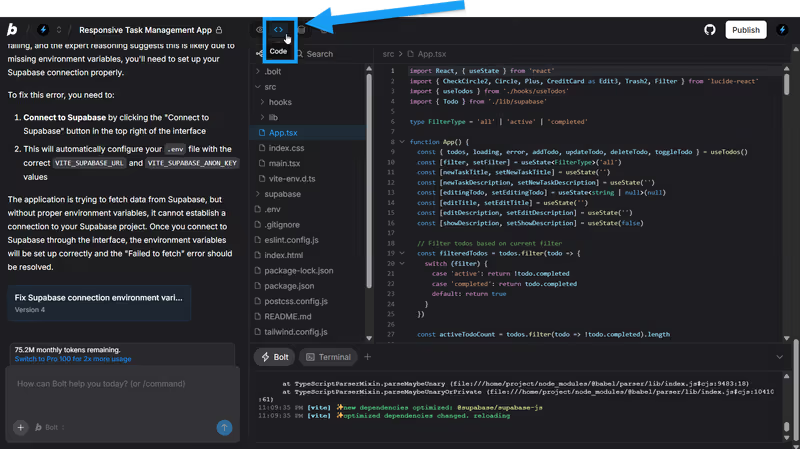
bolt.new
Bolt homepage
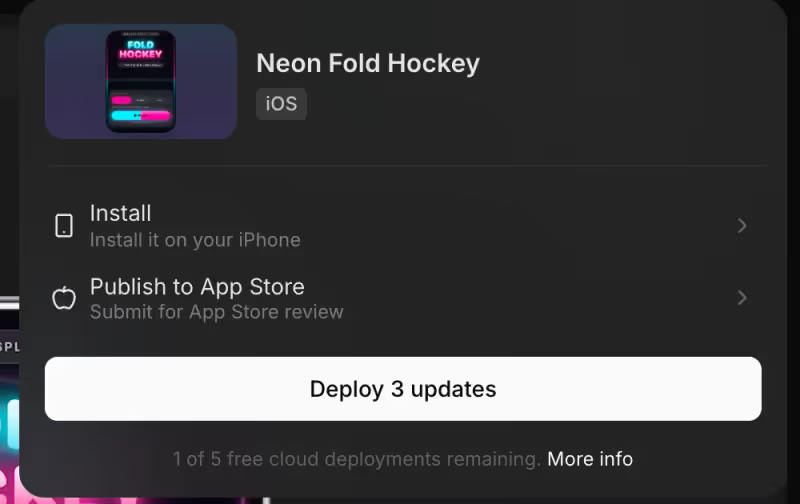
www.vibecodeapp.com
VibeCode homepage

The fairest way to evaluate Bolt and VibeCode is through a standard operational task: a small business web app where users sign in, view their own profile information, and upload files. The user experience is straightforward, but the underlying mechanisms are complex. Both platforms approach this through natural language prompting, yet they split dramatically on their execution targets. One targets the standard desktop browser window; the other targets the native mobile viewport.

Judging this matchup on a business-shaped app with logins and per-user data exposes the exact technical points where AI-powered generation faces a wall. If the code is generated on the fly, database row isolation and state sync are no longer abstract developer tasks - they are immediate security and maintenance configurations. A simple visual directory is easy to generate; a secure, relational business database with true login-gate checks makes these tools explain their plumbing.


The audience

Who each one is for

Bolt

  • Developers and teams needing rapid React and Node.js scaffolding that runs entirely in the browser
  • Technical builders who want the safety of standard Vite repositories over proprietary abstractions
  • Organizations that prioritize desktop-first administration panels, internal inventories, or operational portals
  • Creators comfortable with terminal diagnostics, environment variable configuration, and manual codebase auditing

VibeCode

  • Mobile-first entrepreneurs wanting to publish directly to the Apple and Google Play stores
  • Prototypers who prioritize mobile UI patterns and native phone capabilities over desktop layouts
  • Non-technical creators who prefer a direct, natural-language path to a smartphone viewport build
  • Developers looking to spin up swift mobile utilities with a built-in hosted database layer

Bolt assumes you want to write and review a web codebase; VibeCode assumes you want a mobile app in an store and would prefer not to manage the local developer tooling.

The scope

What you'd build with it

Bolt

  • Desktop-centric operational portals, project trackers, and SaaS MVPs with custom React layouts
  • Internal tools with sophisticated state management that sync instantly back to a GitHub repository
  • Web applications requiring immediate, zero-setup Node.js execution within browser WebContainers
  • Web only: what it produces cannot easily be packaged for native mobile app stores

VibeCode

  • Native mobile applications deployed directly to Apple iOS and Google Android app stores
  • Mobile-first utility apps, field-work trackers, or small consumer games
  • Lightweight smartphone MVPs leveraging native mobile gestures and device-native capabilities
  • Desktop interfaces: it is strictly optimized for native mobile viewport frames and layouts

The plumbing question

Under the hood, Bolt scaffolds a Vite-fronted React frontend connected to whatever database schema you prompt, running client-side inside WebContainers. This creates a highly performant developer setup, but leaves the data isolation plumbing entirely to the AI's generated code. In a small business web app with user logins, your per-user data security is only as secure as the database rules and API queries Bolt's LLM generates. Because Bolt lacks a visual administrative database manager, you must identify and fix any client-side query exposure or insecure CRUD routes by querying the AI or writing raw code.

VibeCode approaches the backend differently by provisioning its own managed cloud setup, user authentication, and file storage out of the box. The database is pre-wired to support mobile viewport applications from natural language prompts. However, as business logic grows across multiple user roles, the generated mobile application code can hit a complexity wall. While VibeCode abstracts the hosting and provisioning, a non-developer remains dependent on the AI's output to verify that user logins are robustly gated and that database queries do not silently leak records between different logged-in sessions.

Strengths

Where each one is strong

Edge: Bolt

Bolt claims the edge for web applications because of its standard, zero-dependency Node.js environment running directly in the browser.

Bolt

  • In-browser WebContainers run a full Node.js stack with native package installations and hot-reloads
  • Direct GitHub sync and standard Vite-React codebase exports remove vendor lock-in
  • Excellent desktop-first design flexibility for administrative interfaces and operational tables
  • A generous free tier that provides 1 million tokens for prototype testing

VibeCode

  • True native mobile publishing to the iOS and Android store on paid tiers
  • Managed database, auth, and cloud storage provisioned automatically on creation
  • Transparent credit pricing that matches raw AI model API usage with no markups
  • Direct SSH connections on Pro plans to link code directly into editors like Cursor

Failure modes

Where each one breaks

Edge: Bolt

Bolt's failure modes are easier to debug via code, whereas VibeCode's performance and code-generation limits can block store approvals.

Bolt

  • Regression loops and token burn during complex iterations, often rewriting working pages recursively
  • Out of memory errors and WebContainer compile hangs on larger codebases
  • Account pauses due to project-too-large constraints even on premium paid tiers
  • Lack of a visual schema editor forces total reliance on prompting to edit databases

VibeCode

  • Complexity walls on multi-tenant business applications that require nested relational schemas
  • Context window dilution on larger applications, leading to forgotten features and broken APIs
  • Inability to deploy a desktop tablet interface due to a strict native mobile layout focus
  • Code lock-in on lower pricing plans that restrict direct SSH and codebase exports

Iteration cost

The fix loop, priced

Even

Pricing structures lean on two completely different credit systems, making iteration cost highly project-dependent.

Bolt

  • Pro plan begins at $25/month, providing a baseline of 10 million tokens
  • Reported burn rate: tokens are spent quickly on edits that fail or recursively rewrite files
  • Worst-case loop: exhausting a premium credit limit on a single generation loop error
  • Paid accounts allow rolling over unused tokens for up to two consecutive months

VibeCode

  • Plus plan starts at $20/month with exactly $20 in raw AI API credit included
  • Raw AI costs are billed with zero platform markup for models like Anthropic's Claude
  • Worst-case loop: the AI loses context when fixing user-data queries and breaks existing features
  • Export and terminal-level SSH tools are locked behind the $50/month Pro tier

Both tools consume credits for every code change, making complex logic fixes highly subject to the fix loop tax during development.

Exit paths

The code you end up with

Edge: Bolt

A clean React repository with Vite is universally easier for developers to inherit and deploy.

Bolt

  • Provides standard React, Tailwind, and TypeScript repositories on every project
  • Direct sync to GitHub ensures you can clone and self-host the code
  • Clean folder structures that developers can open directly in any IDE
  • No hidden proprietary runtimes or forced custom deployment constraints

VibeCode

  • Compiles native mobile code targeting Android interfaces and iOS standards
  • Self-hosting is more complex due to mobile store dependencies and mobile APIs
  • Code exports are locked on the entry-level plans, requiring the Pro plan
  • Rebuilding files manually after export faces complex mobile framework libraries

When neither wins

If you are building a small business web app with logins, user roles, and per-user data isolation, both contenders represent a standard security gamble. You are prompting an AI agent to write custom authentication checks, secure database triggers, and data filters: a process vulnerable to regressions and silent leaks. If you cannot personally trace and audit the generated raw code, you are maintaining technical debt on day one.

For businesses that want this app to run securely without developer overhead, Softr handles logins, user groups, and record-level permissions as core platform configurations. There is no generated authentication code to audit because there is no generated code at all. Softr's AI Co-Builder configures native, secure blocks directly on top of Softr Databases instantly. It acts as the tool with no fix loop because adjustments are made via settings, not re-prompting. It will not suit you if you must publish a native mobile app to the Apple App Store, but for operational, secure web apps, it resolves the security risk entirely.

Verdict

Bolt wins this comparison for small business web apps, conditionally. If you require a desktop-accessible web app running standard React code that your team can export to GitHub, Bolt provides the developer-centric workspace to build it. Its browser-native WebContainers let you run terminal commands and package installations directly, meaning you have real code to inspect once the app structure is scaffolded.

VibeCode is the correct selection only if your small business app is strictly mobile. If your field team or operators require a native iOS or Android app installable on their smartphones, VibeCode bypasses the web compile limits of Bolt and manages the store packaging flow. However, you will need to budget for the Pro plan to get SSH and export controls once your mobile logic climbs in complexity.

For non-developers building an internal login-gated portal, neither tool is the right tool to live with. Delegating row-level database security policies to an LLM's raw generation is a major hazard on day two. Use a secure, visual visual system like Softr where security and user roles are native settings, keeping the deployment boring and your application data perfectly safe.

Q & A

Frequently Asked Questions

Is Bolt better than VibeCode for a small business app?

Bolt is the better choice for desktop web apps, internal admin panels, and standard React codebases. VibeCode is optimized specifically for native mobile smartphone applications and publishing to mobile app stores.

Can I export my code from Bolt and VibeCode?

Yes, Bolt offers direct sync to GitHub on all tiers. VibeCode allows code exports and SSH access, but restricts these features to its Pro plan ($50/month) and higher tiers.

Who has a better pricing model, Bolt or VibeCode?

Bolt has set token tiers starting at $25/month. VibeCode operates on a transparent credit model starting at $20/month, charging you the raw API pricing of models like Anthropic, though export tools are reserved for Pro tiers.

What is the best alternative for non-developers who need secure user login apps?

Softr is the recommended alternative because user groups, authentication, database storage, and record permissions are handled as visual platform configurations rather than raw generated code that you must audit.

