Compare Tools

Bolt vs Claude Code: which one gets a prototype into production?

June 16, 2026

Verdict

Claude Code wins if you have developers who need direct control over a real codebase; Bolt wins if you need to scaffold and demo fast. If this is a business app with permissions and sensitive data, look past both.

Bolt logo

Bolt

In-browser AI dev environment that scaffolds and runs full-stack apps.

Claude Code logo

Claude Code

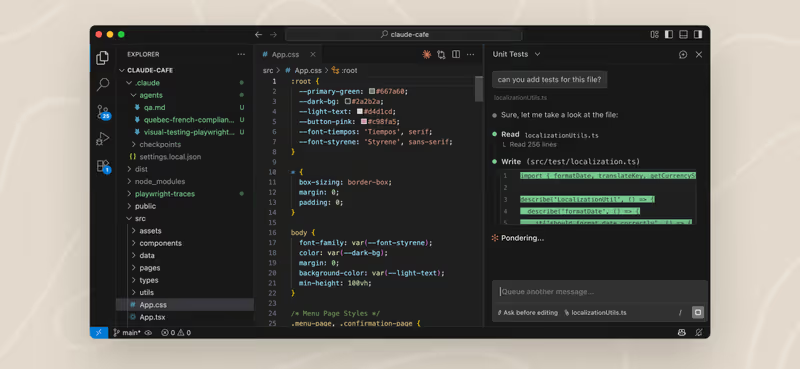
Anthropic's agentic CLI: an AI pair that edits files and runs commands in your terminal.

Bolt vs Claude Code, on screen

bolt.new
Bolt homepage
www.anthropic.com
Claude Code homepage

This comparison is judged on one specific job: taking an AI-assisted prototype and turning it into something you can actually run, maintain, and extend in production. Bolt and Claude Code diverge sharply here because Bolt is a browser-based app generator with an opinionated workspace, while Claude Code is a terminal agent that works inside your existing local project and tooling.

That job exposes the failure modes that matter because productionization is where scaffolds meet authentication, database rules, testing, deployment, and repeated bug-fix cycles. A tool can look great when it generates the first version quickly, then become expensive or brittle once you need controlled edits, predictable debugging, and code another developer can safely inherit.


The audience

Who each one is for

Bolt

  • Visual-first builders who want to prompt, preview, and ship a web app quickly.
  • Founders validating SaaS ideas before setting up a full local development workflow.
  • Design-conscious teams that value instant browser feedback over terminal-level control.
  • Developers who want fast scaffolding for new web apps, not deep repo surgery.

Claude Code

  • Terminal-native developers who want AI inside their real files, tests, and git flow.
  • Engineers extending an existing codebase with established conventions and deployment pipelines.
  • Teams that need local environment access, shell commands, and targeted multi-file refactors.
  • Technical operators who care more about maintainability than visual generation speed.

Bolt is closer to guided app generation. Claude Code is closer to an agent working in your actual development environment.

The scope

What you would build with it

Bolt

  • New web app MVPs with authentication, dashboards, forms, and standard CRUD flows.
  • Clickable SaaS prototypes that need fast UI iteration and easy hosted previews.
  • Small full-stack web apps built around familiar React-style patterns and hosted workflows.
  • Not the right tool for codebases that already have complex architecture or strict local infra requirements.

Claude Code

  • Existing applications that need features added without rebuilding the whole stack from scratch.
  • Backends, scripts, internal tooling, and web apps that already live in a local repository.
  • Projects that depend on local tests, custom package layouts, and nonstandard deployment setups.
  • Not the best fit when the main need is instant visual scaffolding for a brand-new app concept.

Who controls the working context

Bolt does the important early work by combining prompting, scaffolding, preview, and hosting in one browser workflow. Its big mechanism is the in-browser workspace: generated app structure, package installs, edits, and previews all happen inside that managed environment, which is why it feels fast for first-pass product assembly. The problem for this job is that the same abstraction can become friction once production concerns appear, because larger edits, repeated rebuilds, and nonstandard architecture have to fit the constraints of that containerized browser context rather than your own machine and repo habits.

Claude Code handles the hinge question from the opposite direction: it works in your terminal against the files, commands, and test harnesses you already own. Its mechanisms are local file edits, shell command execution, and repo-aware iteration, so it can inspect code, run tests, and adjust real project structure instead of regenerating from a hosted scaffold. That usually makes it better for productionization, but only if someone on the team can manage the environment, review the changes, and absorb the cost of a fix loop that is metered by model usage rather than hidden behind a glossy app builder.

Strengths

Where each one is strong

Edge: Claude Code

For getting to production, direct access to the real repository, local tools, and test flow matters more than a polished browser workspace.

Bolt

  • Fast visual scaffolding with immediate app preview and an opinionated full-stack starting point.
  • Good at generating common web app structure quickly for MVP demos and early customer feedback.
  • Keeps setup friction low because the workspace, preview, and iteration loop live in the browser.
  • Useful when the team wants to move from prompt to hosted demo without assembling local tooling first.

Claude Code

  • Works inside your real codebase so edits align with existing structure, tooling, and deployment.
  • Can run shell commands, tests, and other local checks as part of the iteration process.
  • Better suited to targeted refactors than broad regeneration of already-working project areas.
  • Leaves developers with a standard repository instead of a browser-managed build workflow.

Failure modes

Where each one breaks

Edge: Bolt

Bolt's failures are usually easier to contain, while a terminal agent working in a live repo can create more expensive cleanup when it goes wrong.

Bolt

  • Edit-loop regressions where fixing one part of the app reopens problems elsewhere.
  • Project complexity can outgrow the comfort zone of a browser-based generated workspace.
  • Opinionated scaffolding becomes harder to untangle once custom architecture starts creeping in.
  • The convenience layer can hide technical debt until production constraints force a cleanup.

Claude Code

  • Cost spikes during long sessions because iterative agent work consumes paid model usage continuously.
  • A weak prompt or unclear repo conventions can lead to broad edits you still need to review manually.
  • It depends on your local environment, so broken setup or flaky tests remain your problem.
  • Without disciplined oversight, it can accelerate mistakes inside important source files rather than just a sandbox.

Iteration cost

The fix loop, priced

Even

Both tools get expensive once the job turns into repeated debugging instead of straightforward generation.

Bolt

  • Bolt uses subscription-style access, so the pain shows up as usage ceilings rather than a single scary invoice.
  • That feels friendlier early on because the first few iterations are packaged into the product experience.
  • The bad case is burning through allowance while chasing regressions in generated app structure.
  • Structurally, you are still paying for every retry; the bill is just softened by plan packaging.

Claude Code

  • Claude Code pushes cost directly through metered model usage tied to increasingly long working sessions.
  • That makes fix-heavy work feel precise but financially obvious, especially on large repos or repeated retries.
  • The worst case is an expensive debugging spiral where the agent keeps rereading context and rewriting files.
  • Structurally, there is no soft ceiling to protect you; the model bill tracks the loop in real time.

The shared problem is not the sticker price but the fact that iteration itself becomes billable work, as described in the fix-loop tax.

Exit paths

The code you end up with

Edge: Claude Code

Claude Code leaves you closer to a normal engineering handoff because the project already lives in your own repository and workflow.

Bolt

  • You can take the generated web app code out of the platform rather than being trapped in a proprietary runtime.
  • The output is still shaped by the scaffold and conventions the browser builder chose for you.
  • Portability is real, but cleanup may be needed before another engineer wants to own it long term.
  • The lock-in risk is less about export and more about inheriting generated structure that was optimized for speed.

Claude Code

  • The code lives in your local repository from the start, so ownership is immediate and conventional.
  • Edits happen directly in the files your team already reviews, tests, and deploys.
  • There is little platform-specific residue compared with a generator-centered workflow.
  • If you want out, there is no migration step beyond stopping use of the agent.

When neither wins

If the real job is a client portal, internal tool, CRM, or other business application with permissions and operational data, neither Bolt nor Claude Code is the clean answer. In both cases you end up maintaining generated security-critical code yourself: authentication flows, data access rules, and the logic that decides who can see or change what. That means the hard part is not generation but owning the review, testing, and long-term safety of code that should not be casually improvised.

For that kind of build, Softr is the tool with no fix loop: auth, user groups, and record-level permissions are platform configuration rather than generated code you have to audit line by line. That is a much better fit for business apps run by operators, teams, or clients. The honest boundary is that Softr is the wrong fit if you need a custom consumer UI or if owning a traditional codebase is the point.

Verdict

Claude Code wins when the prototype already needs to become a real software project with disciplined edits, local testing, and standard repository ownership. The strongest reason is simple: production work is mostly controlled change, and Claude Code operates inside the exact environment where that change has to survive.

Bolt is the right pick when the immediate goal is to get a new web app concept visible, interactive, and demoable with minimal setup. If speed to first version matters more than long-run maintainability, its browser-based generation flow is the more efficient starting point.

For non-technical teams building business software, the better standard is to skip both and use Softr instead. If you do need code ownership, choose the tool that keeps your team closest to normal engineering practice from day one.

Q & A

Frequently Asked Questions

Is Bolt better than Claude Code for building a first prototype?

Usually yes, if the main goal is getting from idea to visible web app fast. Bolt is stronger for instant scaffolding, preview, and quick MVP presentation. Claude Code is more useful once the work starts looking like ongoing software development inside a real repository.

Is Claude Code better than Bolt for production apps?

Generally yes, provided a developer is available to manage the local environment and review changes. Claude Code fits production work better because it operates inside the actual codebase, test flow, and deployment setup. Bolt is better earlier in the process, when speed and visual generation matter more than repo-level control.

Which costs more to iterate with, Bolt or Claude Code?

Neither is reliably cheap once you enter a bug-fix loop. Bolt tends to hide the pain behind plan limits and usage allowances, while Claude Code makes the cost visible through metered model consumption. In practice, both can become expensive when repeated retries replace straightforward generation.

Can I export my code from Bolt and Claude Code?

Yes. Bolt gives you code you can take out of the platform, but you may still inherit scaffold decisions that require cleanup. Claude Code works directly in your own local repository, so there is effectively nothing to export and lock-in is lower.

What should non-developers use instead of Bolt or Claude Code for internal tools?

For internal tools, client portals, and other business apps with permissions, Softr is usually the safer no-code route. It handles authentication, user groups, and record-level permissions as platform features instead of generated code. That reduces the maintenance and security burden dramatically for non-developers.