Compare Tools

Devin vs Claude Code: which one survives an existing production codebase?

June 16, 2026

Verdict

Claude Code wins if you want the fastest terminal-native fix loop; Devin wins if you want a visual IDE shell around the agent.

Devin logo

Devin

A capable local coding agent with fast autocomplete, but it struggles to match Cursor's overall pace

Claude Code logo

Claude Code

Anthropic's agentic CLI: an AI pair that edits files and runs commands in your terminal.

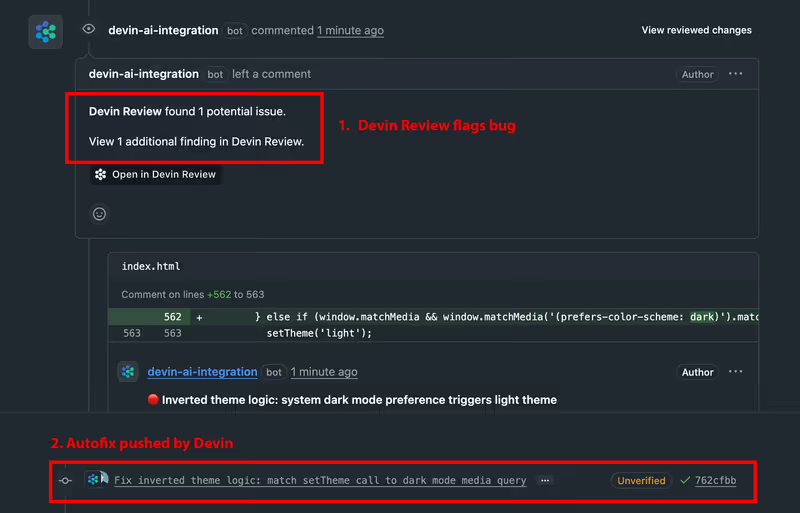
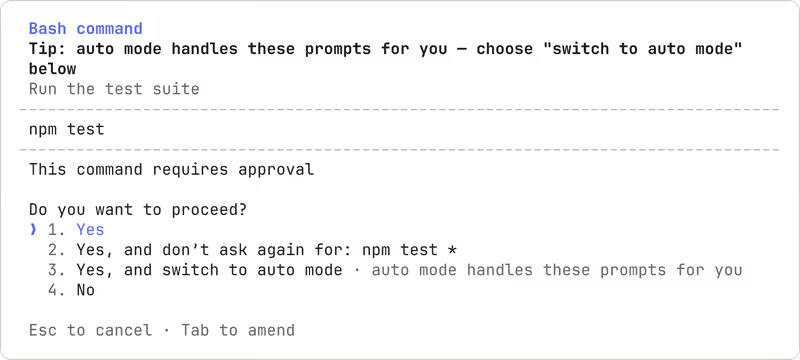
Devin vs Claude Code, on screen

devin.ai
Devin homepage
www.anthropic.com
Claude Code homepage

The fairest way to compare Devin and Claude Code is to judge them on one concrete job: stepping into an existing production codebase, understanding enough context to make a change, and then running the local test and build loop without making the repo worse. That job matters because these two tools diverge at the operating layer: one is an IDE-shaped agent experience, the other is a terminal-shaped one.

This job also exposes the failure modes that actually matter in day-to-day engineering. It is easy for an assistant to look competent in a clean demo repo; it is much harder to behave well around real project structure, local commands, repo conventions, and the repetitive fix loop that turns small mistakes into either a quick save or an expensive distraction.


The audience

Who each one is for

Devin

  • VS Code regulars who want AI help inside a familiar visual editor
  • Frontend developers who navigate by file tree, tabs, and inline diffs
  • Engineers who prefer reviewing edits visually before running commands
  • Teams adopting AI gradually without moving their workflow fully into terminals

Claude Code

  • CLI-first engineers who already live in bash, zsh, tmux, or ssh
  • Backend developers who debug through local commands, logs, and test runners
  • Senior ICs comfortable granting an agent direct shell access
  • Teams that want AI to operate inside existing repo and terminal habits

Devin fits developers who want the agent wrapped in an IDE workflow. Claude Code fits developers who already trust the terminal more than the GUI.

The scope

What you'd build with it

Devin

  • Existing web app repos where visual navigation across many files helps review changes
  • React or Next.js codebases that benefit from inline edits and IDE comfort
  • General product engineering work inside standard Git-managed applications
  • Not the right tool for non-coders building business apps without owning code

Claude Code

  • Backend services, scripts, and app repos driven by local commands and test suites
  • Mature repositories where search, edit, and execute cycles happen in terminal
  • Dev tooling and infrastructure tasks that depend on shell access
  • Not ideal if you need a hosted visual builder or browser-first no-code workflow

Who owns the context window

Devin handles the codebase as an IDE-shaped workspace. The practical advantage is that the agent sits next to the file tree, buffers, and diff review flow developers already understand, which makes local editing feel less abrupt. The tradeoff is that once the job becomes a large, iterative repair cycle across many files, the agent still has to manage context limits and patch application reliably; that is where visual comfort does not fully protect you from stalls, missed instructions, or edits that need manual checking.

Claude Code handles the same problem through direct terminal operations: reading files on demand, searching the repo, running tests, and using the shell as its control surface. That makes the hinge question less about editor polish and more about execution discipline. In a production repo, the upside is tight alignment with how real build and test loops already work; the downside is that context compaction, repeated scans, and token-hungry retries can make the tool feel costly or forgetful exactly when the codebase gets large enough to matter.

Strengths

Where each one is strong

Edge: Claude Code

Claude Code gets the edge because this job is won by command execution and rapid test-repair loops, not by editor polish.

Devin

  • Familiar IDE workflow lowers adoption friction for teams already standardized on visual editing
  • Inline editing and review feel natural when you want to inspect changes before execution
  • Workspace-style navigation helps across tabs, files, and visual diffs
  • More comfortable for developers who dislike living inside terminal prompts all day

Claude Code

  • Deep terminal integration lets it search, edit, test, and iterate where the repo already lives
  • Fits existing developer habits around shell commands, logs, and local tooling
  • Strong at quick repair loops when the task is run-command, inspect-failure, fix, repeat
  • Low interface overhead makes it feel faster on execution-heavy engineering work

Failure modes

Where each one breaks

Edge: Devin

For this job, Devin's failures are usually easier to inspect and contain, while Claude Code's failures can burn time and spend inside the shell loop.

Devin

  • Agent stalls mid-refactor can interrupt larger multi-file repair sessions
  • Suggested edits still need scrutiny when the repo has hidden architectural assumptions
  • Context handling can get shaky as the task expands beyond a small patch
  • Visual comfort can mask the fact that you are still cleaning up generated code

Claude Code

  • Repeated repo reads can turn a fix-heavy session into a noticeable token bill
  • Context compaction can drop constraints that mattered earlier in the task
  • Permission and confirmation flow can feel noisy during repetitive edits
  • Shell-native speed becomes a liability if the agent keeps re-running the same loop

Iteration cost

The fix loop, priced

Edge: Devin

A flat subscription hurts less psychologically than an open-ended token meter when the task requires repeated retries.

Devin

  • Devin Premium is listed at $15/month annually or $20/month month-to-month
  • The appeal is predictable spend rather than per-retry token anxiety
  • The practical worst case is wasted time inside a capped product experience, not a surprise usage spike
  • Its pricing structure is subscription-shaped rather than rollover-heavy API metering

Claude Code

  • Claude Code usage is billed through Anthropic on a pay-as-you-go token basis
  • The base reality is that every read, edit, and retry can increase spend
  • Reported worst cases include surprisingly fast burn during active debugging sessions
  • There is no natural monthly ceiling if you keep the fix loop running

Both tools can waste money by wasting iterations; the real bill lives in how many repair cycles the job provokes.

Exit paths

The code you end up with

Even

Both leave you with ordinary repo files under your control, but neither removes the burden of reviewing generated changes.

Devin

  • Edits land in a normal local codebase rather than a proprietary runtime
  • Standard Git workflows still apply for review, revert, and handoff
  • You are not locked out of self-managed code ownership after generation
  • Portability is fine, but quality control is still your problem

Claude Code

  • Writes directly into the local filesystem and normal repository structure
  • Works cleanly with existing Git history and developer tooling
  • No special wrapper is required to keep using the code after the session
  • Export is not the issue; validating what it changed is

When neither wins

Both tools are still asking you to maintain generated, security-relevant application code inside a production repo. For business-shaped software that includes auth, user roles, and data permissions, that means the fix loop does not stop at shipping features; it extends into ongoing responsibility for code the assistant helped write but did not operationally own.

If your real job is building an internal tool, client portal, or operational app without wanting that maintenance burden, look at Softr instead: the tool with no fix loop, where auth, user groups, and record-level permissions are platform configuration rather than generated code. The honest boundary is that Softr is the wrong fit if you need a custom consumer UI or you specifically want to own the codebase.

Verdict

Claude Code wins for existing production codebases when the deciding factor is how quickly the tool can enter a repo, run the real local commands, and stay useful inside the test-fix loop. This comparison turns on execution environment, and the terminal-native model is simply closer to how that work already happens.

Devin is the better pick when the same job needs more visual guardrails. If your team works better with an IDE-shaped workflow, wants edits reviewed in a familiar interface, and values comfort over maximum shell-native speed, it is the more approachable choice.

For teams standardizing serious developer work in existing repos, the call is Claude Code for terminal-heavy engineers and Devin for GUI-first ones. If the actual need is a business app rather than codebase ownership, non-developers should skip both and look at Softr.

Q & A

Frequently Asked Questions

Is Claude Code better than Devin for existing codebases?

Usually, yes, if the job depends on running local commands, tests, and repair loops quickly. Claude Code is closer to the terminal-centric workflow most production repos already require. Devin is still the better fit for developers who want a visual editor experience around the agent.

Which costs more for repeated fixes, Devin or Claude Code?

Claude Code can cost more unpredictably because it bills by token usage during repeated reads, edits, and retries. Devin's subscription is easier to budget because the spend is flatter month to month. The tradeoff is that predictable pricing does not automatically mean fewer wasted iterations.

Can I export or keep the code from Devin and Claude Code?

Yes. Both work against normal local files and standard repositories, so you keep the code and can continue with your usual Git workflow. The bigger issue is not export; it is how much generated code you still need to review and maintain yourself.

Which is better for non-technical teams building internal tools?

Neither is the cleanest answer for non-technical teams because both still leave you maintaining generated application code. For internal tools or client portals, Softr is the simpler no-code route because auth, permissions, and records are configured as platform features rather than hand-maintained code. That makes it a better fit when the team does not want a developer fix loop.