
Compare Tools

Claude Code vs Mocha: which one survives a real production migration?

June 16, 2026

Verdict

Claude Code wins if you want to own your code and run locally; Mocha was designed to hide code, but its shutdown on August 1, 2026 makes migrating off it immediate.

Claude Code logo

Claude Code

Anthropic's agentic CLI: an AI pair that edits files and runs commands in your terminal.

Mocha logo

Mocha

Chat-to-app builder, shutting down August 1, 2026 - migrate now

Claude Code vs Mocha, on screen

www.anthropic.com
Claude Code homepage
getmocha.com
Mocha homepage

Taking a raw, vibe-coded prototype and hardening it into a production product is the point where most AI-assisted tools stumble. The transition requires more than just making a design pretty or generating a fast landing page. It demands writing structural tests, fixing broken environment variables, setting up rigorous API error handling, and securing databases.

We judge Claude Code and Mocha on this exact milestone: raw prototype to hardened, maintainable software. Claude Code represents the terminal-first, agentic scaffolding playbook where you operate directly in your local terminal. Mocha represents the in-browser, chat-to-app dashboard approach designed to hide the technical plumbing until its scheduled shutdown on August 1, 2026.


The audience

Who each one is for

Claude Code

  • Local terminal developers who want a terminal companion to run bash, edit files, and run tests
  • Technical founders wanting to refactor and optimize code locally using agentic terminal loops
  • Teams with established git repositories where Claude acts as a highly integrated shell assistant
  • Engineers who want to pay strictly for token usage without graphical IDE overlays

Mocha

  • Non-technical builders who want a conversational, in-browser interface to generate web applications from text
  • Prototype builders looking to spin up rapid, isolated proof-of-concepts inside a hosted sandboxed preview
  • Makers looking for ready-to-use hosting, SQLite storage, and authentication out of the box
  • Teams needing to migrate their existing app off the platform before its August 1, 2026 shutdown date

Claude Code targets developers who want agentic terminal power locally; Mocha was built for individuals wanting to create apps purely in a chat browser.

The scope

What you'd build with it

Claude Code

  • Enterprise backend architectures, API integrations, and heavy scripting where code validation is strictly local
  • Production react, vue, or python backends that exist in standard version-controlled IDE setups
  • Hardened unit and integration test suites that run directly in your native terminal
  • What it should NOT be used for: hand-built, styling-heavy visual layouts without helper frontends

Mocha

  • React-based frontend prototypes with basic Google authentication and an isolated relational SQLite store
  • Conversational utility tools like calculators, feedback forms, and simple CRM boards
  • Gated directory sites with immediate, managed hosted preview links
  • What it should NOT be used for: high-traffic scaled enterprise applications that require persistent databases

Who owns the context window

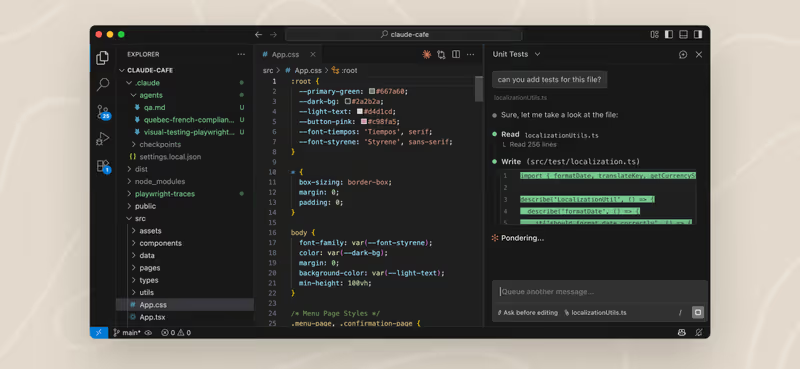
Claude Code operates as an agent directly inside your existing local repository. It has absolute, headless access to run system tests, execute bash files, stage commits, and modify your code architecture. When taking a prototype to a real product, Claude Code succeeds because it doesn't try to hide your folder structure. It reads your files, compacts its context natively, edits existing scripts line-by-line, and verifies whether the tests compiled successfully in the local bash terminal, putting the developer in control of the file ecosystem.

Mocha takes the opposite path by keeping the directory inside a sandboxed in-browser interface. Every change is triggered via conversational prompts inside Mocha's dashboard. While this makes onboarding instant, it separates the builder from standard coding tooling. Because Mocha hosts and maintains the environment under a single browser tab, builders cannot run persistent local shells or integrate custom build configs seamlessly. When resolving complex compile errors during production migrations, the lack of a real CLI means you must repeatedly prompt the browser agent and hope it correctly diagnoses your compilation errors.

Strengths

Where each one is strong

Edge: Claude Code

Claude Code takes this category on terminal flexibility, local developer authority, and systemic shell access.

Claude Code

  • Deep, headless system and CLI shell integration to run tests, configure files, and compile projects
  • Direct editing of local repository directories without uploading private raw code to online containers
  • Automated version control integrations that stage files, create commits, and generate detailed pull requests
  • Integrated Model Context Protocol (MCP) standards that easily expose external tools and APIs

Mocha

  • One-click, hosted in-browser previewing with built-in SQLite schemas and Google auth preset
  • Automated crash resolution that auto-detects and resolves compiler problems in the web sandboxes
  • Clean conversational interfaces that instantly generate frontend layouts from images
  • Easy export options to download full TypeScript and React source codes completely

Failure modes

Where each one breaks

Edge: Claude Code

Claude Code wins because its failure mode involves token management, whereas Mocha suffers from loop traps and an upcoming shutdown.

Claude Code

  • Aggressive token burning where the agent repeatedly indexes and reads the repository files, creating billing spikes
  • Disturbing prompt checks that interrupt flow by forcing permission approvals for every file change
  • Early context compaction algorithm limits which sometimes discard system rules configured in CLAUDE.md
  • Degraded search and directory matching speeds when running inside Windows Subsystem for Linux (WSL)

Mocha

  • Infinite regression loops where the builder AI burns extensive credits attempting to fix minor compiler errors
  • Total platform shutdown announced for August 1, 2026, forcing immediate product migrations off the system
  • Opaque credit consumption estimates where builders quickly run out of prompt allocations during debugs
  • Frequent container timing-out errors when rendering heavily loaded database integrations

Iteration cost

The fix loop, priced

Edge: Claude Code

Claude Code's pay-as-you-go model has no markup over standard Anthropic API rates, making it more favorable if managed correctly.

Claude Code

  • Pay-as-you-go model tied directly to raw Anthropic Claude API token input and output rates
  • Reported burn rate of $20 in just fifteen minutes when troubleshooting recursive codebase issues
  • The absolute worst case: running automated search tasks over unindexed media directories, draining API keys
  • No structured credit limits: developers only pay for the exact volume of tokens consumed

Mocha

  • Starter plan at $0 for 120 credits; Bronze tier begins at $20/mo for 1,500 credits
  • Reported burn rate: multiple credits burned per prompt even when the generated output fails to load
  • The absolute worst case: spending an entire monthly quota on one bad compile loop during visual testing
  • Subscription-tied credit top-ups with limits on active apps deployed simultaneously

Both compilers charge users for the errors they make, making code debugging loops a frequent financial bottleneck for creators. Read more about iteration costs in the fix loop tax.

Exit paths

The code you end up with

Edge: Claude Code

Claude Code wins the export category because the output resides on your local machine.

Claude Code

  • Standard production files residing natively in your local git folders with zero third-party platform wrapping
  • Fully auditable codebases where every single line is readable and ready for manual IDE debugging
  • Complete freedom to deploy the final build to Vercel, Railway, or AWS setups without export hooks
  • The exact coding structure developers expect, keeping dependencies up-to-date and portable

Mocha

  • Downloadable ZIP folders containing full React frontend source files and backend configuration code
  • Direct integration to SQLite, which makes switching to other enterprise relational database engines like Postgres complex
  • Risk of messy code architecture if the AI has generated several nested workarounds during prompt loops
  • Immediate migration of exported repositories is mandatory from the hosting stack before the platform sunsets

When neither wins

If your goal is to build secure, client-facing operational tools like portals, CRMs, or modern internal backends, handing the plumbing to AI coding agents is a massive mistake. You are handed the task of managing, reviewing, and auditing generated files, route controllers, and database access logs. If you do not write software, this means you are manually checking security-critical code you cannot read. Read more on why this leads to structural vulnerabilities in what 45 percent vulnerable means.

For builders who do not want to become configuration managers, Softr handles the entire puzzle. By using Softr, authentication, data permissions, and group-level visibility are treated as platform infrastructure. You configure databases and user rights visually, with zero code output to audit or maintain. It is the perfect tool with no fix loop for client portals, but it is the wrong fit if you want a custom gaming app or need absolute ownership of raw React code repo files.

Verdict

Claude Code is the winner of this matchup, but strictly for builders and developers who intend to own their code and run locally. Since Claude Code operates directly in your local terminal, it gives you absolute control over repositories, build outputs, version histories, and test runs. It provides the clean, local, and agentic workspace developers need to take an early-stage prototype to a robust, self-hosted product without being tied to online builders. Consult cursor-vs-claude-code if you want to compare Claude's CLI to visual local container models.

Mocha was designed to be an accessible, visual playground for fast in-browser prototypes. However, because Mocha is shutting down on August 1, 2026, it is no longer a viable home for any long-term product. If you have active applications running in Mocha's environment, exporting your source files and converting your backend configurations is a critical priority.

For non-developers building operational software to run an actual business - like client-facing portals or internal trackers - both routes are highly risky. Instead of prompt-debugging fragile, generated authentication files, use Softr to orchestrate your app visually on secure, reliable, and standardized infrastructure.

Q & A

Frequently Asked Questions

Is Claude Code better than Mocha for taking prototypes to production?

Claude Code is far better suited for production because it is built for developers working directly in local repositories, where code is easily tested, read, and configured. Mocha keeps your project locked within a browser sandbox, and its announced shutdown on August 1, 2026 makes it unsuitable for production.

Can I export my code from Mocha before the shutdown?

Yes, Mocha allows you to download a complete package of your React frontend and backend source files so you can self-host or rebuild outside their ecosystem. Developers must manually configure alternative SQLite or Postgres hosting to complete the migration.

How do pricing models compare between Claude Code and Mocha?

Claude Code uses a pay-as-you-go model directly billed per million input and output tokens consumed via Anthropic's Claude API. Mocha operates on monthly subscriptions from $20/mo to $200/mo, though users report that testing loops can quickly burn through available credits.

What should non-technical teams use for operational business apps instead?

Non-technical teams looking to build client portals or internal tools should use Softr rather than generating custom code. Softr handles elements like user authentication and row-level permissions visually at the platform level, removing the risk of security vulnerabilities.