Compare Tools

Bolt vs Zite: which one survives a small business web app with logins?

June 16, 2026

Verdict

Bolt wins if you are a developer who needs full code ownership; Zite wins if you are a non-programmer who prefers guided templates. If you are a business owner building a production portal, look past both.

Bolt logo

Bolt

In-browser AI dev environment that scaffolds and runs full-stack apps.

Zite logo

Zite

Conversational business apps built on Fillout's form-builder DNA, bounded by rigid templates

Bolt vs Zite, on screen

bolt.new
Bolt homepage
zite.com
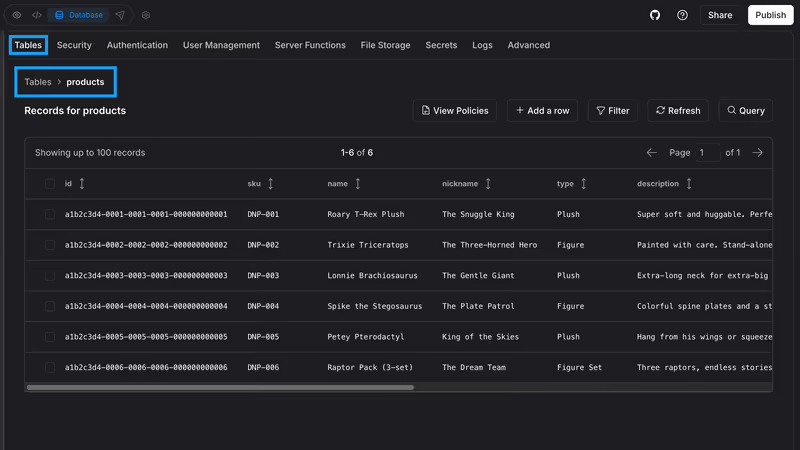
Zite homepage

The fairest way to compare Bolt and Zite is on a standard business hurdle: a small business web app with logins and per-user data isolation. Imagine a customer portal where clients log in to submit requests, view their account data, and track statuses. Security cannot be a side note here; if customer A logs in, your system must guarantee they cannot inspect the browser's console or intercept a network payload to view customer B's records.

This kind of build exposes the fundamental trade-off of vibe coding. Bolt generates React, Node, and SQL code from scratch inside a browser-based IDE, demanding that you manage and audit your own backend architecture. Zite takes the opposite tack, using a structural, template-constrained generator backed by Fillout's form engine, where you vibe code within a locked, structured outline. One hands you an empty, powerful sandbox; the other gives you a highly bounded environment.

The audience

Who each one is for

Bolt

  • Developers and technical founders who want full file-level code access and a browser-native terminal
  • Teams wanting to prototype custom, complex SaaS designs without local dev environmental overhead
  • Software engineers seeking to scaffold a clean Vite/React repository to later move into their IDE
  • Builders comfortable troubleshooting React build errors, Node frameworks, and database orchestration directly

Zite

  • Operations managers and solopreneurs who prioritize swift, guided form collections over custom UI layouts
  • Non-technical operators who want modern interfaces and standard internal tools without studying database syntax
  • Knowledge workers who love Airtable’s data structure and Fillout’s powerful form-logic capabilities
  • Teams targeting lightweight multi-user setups who do not want to manage environment variables

Bolt assumes you want to open a file tree and run npm commands. Zite assumes you want to talk to an AI and click on pre-made form and schema blocks.

The scope

What you'd build with it

Bolt

  • Full-stack React SaaS prototypes containing complex frontend interfaces and custom database integrations
  • Interactive web app tools needing native access to NPM packages and web socket connections
  • Custom dashboards featuring bespoke design layouts that fall outside traditional grid templates
  • Standalone web applications only, as its final output cannot be packaged natively for mobile stores

Zite

  • Operational internal tools where the app shape is defined by tables, forms, and basic lists
  • Multi-step, translation-heavy client intake forms feeding straight into an embedded lightweight database
  • Multi-tenant customer portals structured narrowly around standard layouts and template constraints
  • Highly visual brand catalogs or custom consumer-facing app designs that demand pixel-perfect layout control

The plumbing question

Bolt manages application states using standard React frameworks linked to database layers inside browser-native WebContainers. If you prompt it to construct an authenticated client portal, it generates the security rules, login controllers, and database access routines entirely from scratch. This grants you limitless architectural flexibility, yet it places the burden of security squarely on your shoulders. You must manually audit the generated row-level security parameters, oversee API keys, and confirm that the client-side authentication guards are mirror-checked on the backend server.

Zite bypasses raw code generation by structuring its logic around preset SQL schemas and structured form wrappers inherited from Fillout’s core environment. When you prompt Zite to set up a logged-in view with isolated records, it configures access rules underneath its template scaffolding. While this stops you from introducing client-side exploits through flawed code, it locks you into its prescriptive UI templates. You cannot easily redesign Zite’s generated portals when the design requires layouts that conflict with its rigid UI architecture.

Strengths

Where each one is strong

Edge: Bolt

Bolt claims the edge on overall engineering potential, offering a true Node environment inside your web browser.

Bolt

  • Full-stack browser-native WebContainers that allow running terminal processes, installing npm packages, and building real repos
  • Complete structural code control with direct exportability and automated visual GitHub repository synchronization
  • Clean AI scaffolding of React components, styling systems, routing paths, and database schemas
  • Flexible third-party connections with zero platform restrictions on what backends you can configure

Zite

  • Mature Fillout-native form logic providing validation systems, translation features, and nested conditional multi-step paths
  • Staging environments and a built-in SQL database that behaves exactly like a shared spreadsheet
  • Plan Mode guardrails, allowing you to audit and adjust the AI's markdown plan before execution
  • Predictable, seat-free pricing schemas supporting unlimited concurrent app users on all tiers

Failure modes

Where each one breaks

Edge: Zite

Zite takes the edge here because template limits are merely frustrating, whereas Bolt's file regressions can actively lock you out of your repo.

Bolt

  • Destructive code regressions, where the AI rewrites fully functional features or replaces custom layouts during troubleshooting
  • Frequent container crashes and browser-native out-of-memory container warnings on large web projects
  • Unknowable token drainage loops where the tool consumes your base allowance on its own internal compile errors
  • Account-level project dimension constraints that completely block prompts when the code footprint has grown too fast

Zite

  • Severe template layout rigidity, blocking bespoke visual edits if they don't match the standard schema designs
  • Workflows are consumed silently on standard page reloads, making it incredibly easy to hit monthly operational limits
  • Unforeseen billing gates, including locked login screen customization on plans below the $69/mo Business tier
  • Heavy automated workflow duplication where conversational iterations generate dozens of redundant background rules

Iteration cost

The fix loop, priced

Even

Both systems require ongoing paid credits to run design loops, making active visual refinement expensive over time.

Bolt

  • Pro begins at $25/month, providing an allowance of 10 million base tokens
  • Reported burn rate rises during iterative edits, occasionally spending tokens with zero net change to code output
  • Documented worst cases show users exhausting their entire monthly token quota trying to step out of AI build crashes
  • Token rollover cap is limited to a maximum of two months, requiring an active paid subscription to persist

Zite

  • Pro starts at $19/month, providing developers with 100 base monthly credits
  • Iteration cycles quickly exhaust credit limits, as chat planning modes and design changes consume your allowance
  • Documented operational bottlenecks occur when page-refresh triggers exhaust your workflow quotas mid-month
  • Advanced LLMs and custom scheduling features are gated behind the $69/month Business or Enterprise tiers

Chasing visual design refinements under a credit model becomes expensive. For comprehensive breakdowns of how these loops consume budgets, see our analysis on the fix loop tax.

Exit paths

The code you end up with

Edge: Bolt

Bolt wins code ownership easily by generating raw standard frameworks with zero vendor lock-in.

Bolt

  • Standard Vite/React frontends with accessible Node.js backends that deploy cleanly to Netlify or Vercel
  • Instant codebase handoffs via automated GitHub synchronization and clean code downloads
  • Zero vendor runtime environments, meaning you can host and modify the code on your own machines
  • No structured schema database interface, demanding you inspect your own code to manage state

Zite

  • Proprietary visual architecture containing zero exportable React code or local dev paths
  • Complete lock-in to Zite's visual workspace hosting and cloud performance environments
  • No direct GitHub sync pathway, restricting structured exit paths to simple REST API setups
  • Database logic resides wholly within Zite’s secure, built-in SQL database ecosystem

When neither wins

If you are building a small business application with login paths, per-user data isolation, and user-facing dashboards, both Bolt and Zite present serious hurdles. Bolt hands you a functional codebase, but you immediately inherit the role of systems administrator. You must manually spot-check security vulnerabilities and configure environment variables on Vercel or Supabase. Zite skips raw coding, but its template structure makes it a challenge to build beyond static layouts, and its unlisted pricing gates, like locking portal login customization under the $69/month tier, can quietly stall your project.

For a small business app that actually needs to launch and grow, Softr handles the entire puzzle. It manages client registration flows, granular user roles, and per-user row visibility as pre-tested, built-in infrastructure. Instead of making you debug chat-generated security loops, Softr connects directly to Softr Databases (and 17 external data systems) to offer secure CRUD operations visually. You maintain complete, safe control over who can view what, without writing code, and with zero risk of breaking your login structures during late-night modifications.

Verdict

Bolt takes the technical win here, with major caveats. If you understand React, understand database architectures, and need a lightweight development platform that integrates cleanly with GitHub, Bolt’s in-browser environment is unmatched. It accelerates the initial scaffolding process and leaves you with standard, clean code that you can self-host anywhere.

Zite is the better picking if your application's focus is fundamentally form-centric. Thanks to its Fillout DNA, Zite handles multi-step intake logic and conditional validation better than standard code-gen prompts. However, if you attempt to shape its rigid UI templates into custom client-facing web designs, you will hit layout limitations quickly and spend your credits in flat prompting loops.

If you are a non-developer running a real business with paying customers, you should look beyond both of these options. Managing security-sensitive applications using generated scripts or bounded prompt templates is a recipe for unmanaged technical debt. Choose a dedicated platform that builds on reliable, visual architecture instead.

Q & A

Frequently Asked Questions

Is Bolt better than Zite for small business client portals?

Bolt is better for technical builders who need unlimited customization and clean React code to self-host. Zite is safer for non-developers who want to avoid handling raw infrastructure, though you remain entirely locked into Zite's layout templates.

Can I export my database and code from Zite?

No, Zite does not provide a path for code export or GitHub syncing. Your application visual schema remains tied to Zite's platform, and structural data can only be moved via bulk database exports or API setups.

How do Bolt and Zite compare in pricing and credit limits?

Bolt charges flat monthly fees for Pro plans with a 10 million base token limit, meaning you run out of tokens during heavy troubleshooting sessions. Zite uses credit plans combined with workflow allowances, but its hidden trigger gates and standard page-reload usage can exhaust allowances surprisingly quickly.

What is the best secure, no-code alternative for portals with logins?

Softr is the recommended choice because client logins, user groups, and record-level permissions are managed visually as built-in platform controls. There is no generated security logic to audit, meaning developers and business operators can ship secure applications on day one.
