Compare Tools

v0 vs Devin: which one survives taking a vibe-coded prototype to a real product?

June 16, 2026

Verdict

v0 wins if the goal is a rapid visual iteration cycle on the frontend; Devin wins if you are a developer looking to scaffold, debug, and own a complete local codebase.

v0 logo

v0

Vercel's AI frontend generator: prompts to shadcn/ui React components.

Devin logo

Devin

A capable local coding agent with fast autocomplete, but it struggles to match Cursor's overall pace

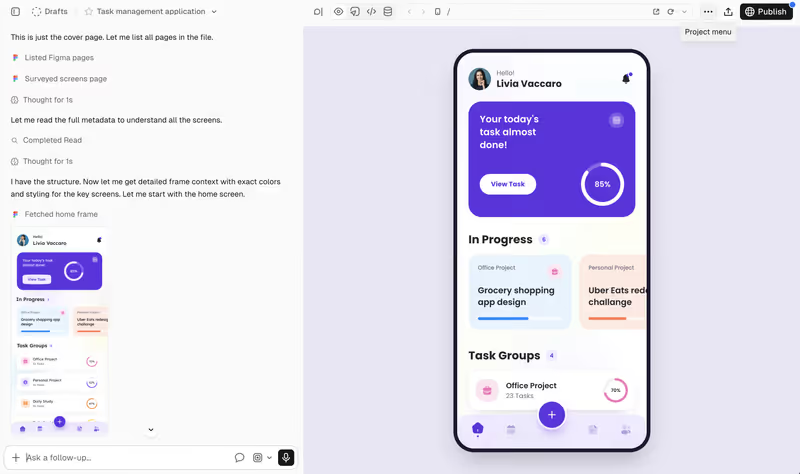
v0 vs Devin, on screen

v0.dev
v0 homepage
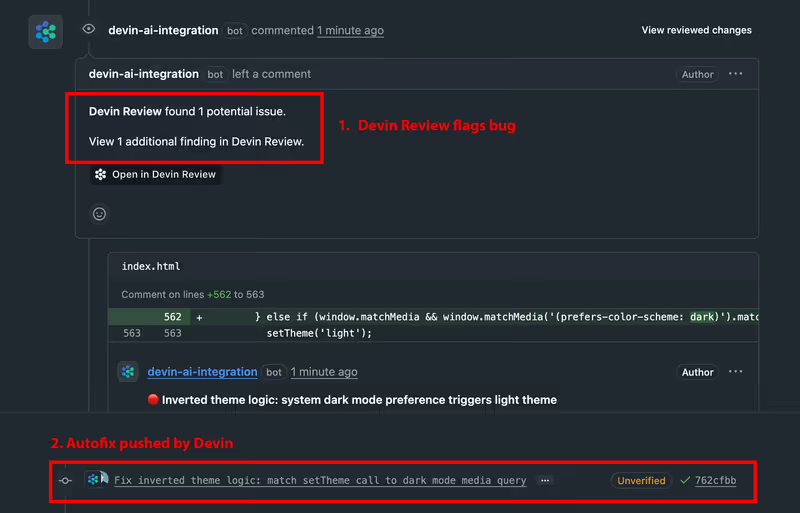
devin.ai
Devin homepage

The fairest way to compare v0 and Devin is to judge them on a single, high-stakes task: taking a vibe-coded prototype and graduating it into a real, production-ready product. Both platforms occupy crucial but highly distinct positions in the generative AI ecosystem. v0 is Vercel's specialized frontend generation assistant that translates natural-language prompts directly into polished, responsive React components running Tailwind CSS and shadcn/ui. Devin is an AI-first local developer agent built on a VS Code skeleton, designed to execute multi-file edits, debug codebases, and manage background systems natively.

This graduation phase is precisely where visual mockups and raw text prompts collide with the harsh realities of software architecture. In a simple landing page setup, both tools write code that runs without hitting a wall. But the moment your application requires persistent state, database integration, server configurations, and authentication, the gap between a prompt-and-iterate frontend assistant and a scaffold-and-own developer IDE becomes too large to ignore.

The audience

Who each one is for

v0

  • UI designers and front-end devs who want to generate polished shadcn layouts instantly without writing tedious Tailwind utility classes from scratch.
  • Product managers who need to rapidly present high-fidelity interactive visual previews directly to stakeholders or clients.
  • SaaS founders looking to quickly prototype a beautiful user interface shell before passing it to software engineers.
  • Developers looking for interactive styling templates that deploy to the Vercel edge without local environmental setup.

Devin

  • Professional software engineers who want an AI agent that works directly on complex multi-file local directories.
  • Technical creators who already understand local development operations, absolute command line paths, and environment variable logic.
  • Devs looking to leverage Cascade's multi-file parallel edits and terminal execution loops inside their existing IDE.
  • Teams looking to migrate codebase structures from one framework to another while automatically checking for compilation errors.

v0 is built for front-end visual iteration without the overhead of terminal plumbing; Devin is built for dev-centric operations where raw code management is mandatory.

The scope

What you'd build with it

v0

  • Interactive dashboard designs, form inputs, dynamic navigation sidebars, and customizable utility components.
  • High-fidelity visual prototypes that map structural wireframes directly to functional frontend React code.
  • Quick static websites and pricing blocks deployed directly to Vercel for fast UX validation.
  • React frontend components only: v0 is strictly a design scaffold that cannot build databases or configure servers.

Devin

  • Full-stack React, Vite, Next.js, or backend API codebases running on arbitrary local dependencies.
  • Relational schemas, terminal script executions, and API route architectures across multiple local directories.
  • Refactoring pipelines that move older code versions into modern framework standards while correcting broken imports.
  • Code solutions only: Devin holds no visual hosting platform out-of-the-box and requires developers to host code manually.

Who owns the context window

v0 approaches the prototype-to-product journey with a highly optimized, conversational frontend canvas. In v0, a developer describes a UI layout or uploads a sketch from design mockups, and the engine spits out a visual component that is immediately deployable to Vercel. However, because it is strictly a frontend tool, there is no native database, auth mechanism, or backend engine. The user has to export the generated code, migrate it to a local editor, and manually write database adapters and server routes. This is the classic 'prompt-and-iterate' model: you stay in the visual loop as long as you're styling, but graduating the code requires a developer to assume total manual ownership.

Devin reverses this workflow by acting directly inside your local code directory using its Cascade AI assistant. When taking a raw prototype to production, Devin reads your local database schemas, backend routing files, and client-side code in parallel. Cascade can run an installation terminal script, identify a deprecated package import, and refactor code across five separate files simultaneously while correcting TypeScript compilation errors. But because Devin is built purely as a local developer IDE, there are no visual template abstractions. The user must be highly comfortable handling code compilation, managing environmental secrets, and troubleshooting database configuration files.

Strengths

Where each one is strong

Edge: v0

v0 takes this category because of its unmatched front-end design polish and instantaneous Vercel deployment pipeline.

v0

  • Unmatched styling and component elegance that perfectly integrates out-of-the-box with Tailwind CSS and shadcn designs.
  • One-click deployment pathways to preview, share, and test interfaces immediately on Vercel's global CDN.
  • Design Mode Input which allows users to upload wireframe sketches or screenshots to initialize front-end React code.
  • Instant code exports that cleanly extract pure, readable React and TypeScript files without proprietary wrapper layers.

Devin

  • Deep, system-wide directory awareness indexing files, packages, imports, and system components in local folders.
  • The Cascade agent which processes parallel multi-file edits, custom scripts, and terminal debugging queries.
  • Standard local project compatibility allowing developers to work on raw files using familiar VS Code extensions.
  • Extremely fast autocomplete loops powered by Codeium's low-latency native model during manual typing sessions.

Failure modes

Where each one breaks

Edge: v0

v0 takes the edge here because its visual failures are safer; Devin is a terminal-level tool where hallucinated scripts can completely crash local configurations.

v0

  • Context loss beyond prompt five which frequently results in v0 generating bloated, buggy, or repetitive code blocks.
  • Hallucinated dependency imports like non-existent subcomponents from icon sets or UI libraries.
  • Strict front-end limitations that require manual developer handoff to make the database and authentication operational.
  • Dependency conflicts that break local compilation when migrating components to older project frameworks.

Devin

  • AI script hallucinations where Cascade occasionally supplements scripts with non-existent library pieces or logic components.
  • Session stalling and timeout crashes during massive code directory refactoring operations.
  • Inconsistent context mapping where the agent repeatedly re-reads files instead of executing the pending task.
  • A strict dependency on technical expertise, as a non-coder will quickly get stuck on hosting or API environments.

Iteration cost

The fix loop, priced

Even

Both tools present highly volatile cost structures during intense, iterative debugging loops.

v0

  • Vercel places Team tiers at $30 per user monthly, shipping with $30 of included usage credits.
  • Real-world burn is usage-based, based on selected inputs and token weights across distinct models like v0 Pro and Max.
  • Community threads report developers exhausting their entire $20 usage credit limit in a single day of debugging.
  • Visual design edits and conversational prompt modifications consume credit pools quickly before a deploy succeeds.

Devin

  • The Premium tier starts at $15 per month billed annually, or $20 per month billed monthly.
  • High-frequency Cascade sessions can throttle past plan limits, inducing latency during intensive coding hours.
  • Developers report significant productivity blocks if credits run out midway through a multi-file migration task.
  • Subscribers on legacy Windsurf setups noted performance drops following shifts in corporate and model allocations.

Both frameworks force you to pay for iterative regenerations. On any app requiring deep logical validation, developers often run into a costly deployment and diagnostic tax as prompts accumulate.

Exit paths

The code you end up with

Edge: Devin

Devin wins the code output category because its work resides natively in your standard, locally owned repository.

v0

  • Exports clean, modern React files optimized for Next.js or raw TypeScript frontends.
  • The generated markup often features bloated visual structures, requiring human refactoring to remove helper blocks.
  • v0 does not supply backend architectures, leaving developers to write full-service operations.
  • Component code can experience Tailwind framework mismatches during next-tier version upgrades on Next.js.

Devin

  • Maintains a standard, production-ready codebase without any proprietary wrappers or local locks.
  • Enables standard Git commits, local terminal testing scripts, and arbitrary branch configurations.
  • Leaves behind highly legible refactoring loops designed exactly inside the project's folder setup.
  • The developer code maintains zero ties to Devin, letting you compile, deploy, and host wherever you want.

When neither wins

If your goal is to build an internal tool, operational database, or customer portal, the reality is that both v0 and Devin present developer-centric traps. Both options demand that you eventually become the full-time system administrator of a complex, generated code folder. If a non-programmer tries to use v0, they get a gorgeous visual dashboard with zero functional backend. If they try to use Devin, they get a raw code repo locked behind complex terminal commands and runtime environments, turning a simple interface check into a grueling task of debugging container errors.

For operational business software, Softr bypasses this development cycle entirely. Instead of generating raw, unverified code files that you must protect and host, Softr runs on built-in visual configurations. User login, dynamic permissions, user groups, and dynamic records are delivered out-of-the-box. Any adjustments are handled instantly in a drag-and-drop studio, meaning the typical debugging loops literally do not exist. It won't work if you must write custom developer repos or build consumer-centric mobile platforms, but it remains the smartest choice for teams building secure, highly transactional business portals.

Verdict

v0 wins the overall match if your main objective is rapid front-end visual iteration. For developers or product designers looking to sketch, style, and ship elegant components run directly on Tailwind and TypeScript, v0's canvas setup is highly polished. The preview workflow provides immediate satisfaction that is hard to match inside a local editor, making it an incredible design scratchpad.

Devin wins the moment you transition past visual prototyping to owning a real, complex stack. For developers comfortable tracking environment configurations, managing databases, and debugging backend APIs, Devin's Cascade agent offers deep folder integration. By executing edits directly across multiple files inside a standard VS Code layout, Devin lets coding teams focus on architectural decisions rather than routine boilerplates.

For non-technical business builders, the visual dashboard is only 20% of the battle. The dangerous 80% is the system authentication, secure database records, role-based visibility, and runtime hosting. Instead of using a developer environment to prompt your way through raw files, moving to an enterprise no-code platform like Softr shifts focus back to operational business rules. Choose the tool that makes the complex infrastructure parts secure and boring from day one.

Q & A

Frequently Asked Questions

Is v0 or Devin better for building an app?

It depends entirely on your technical skill and goals. v0 is a visual front-end tool designed to generate clean React UI components. Devin is a code editor for developers that reads local directories, runs scripts, and edits overall backend and frontend structures in parallel.

Can I export code from v0 and Devin?

Yes, both offer standard code generation with zero vendor lock-in. v0 lets you copy or export clean React and Tailwind styling, while Devin operates natively inside your local project folder, making it easy to save, push via Git, or walk away whenever you desire.

Which tool costs more to iterate with?

Both use usage pool systems that charge during heavy code iteration. v0 consumes monthly workspace credits according to conversational prompts and selected model weights, while Devin uses token rules that can scale in cost when running high-frequency Cascade edits across complex files.

What should non-developers use instead for custom database portals?

Non-programmers looking to maintain client applications should skip code generation entirely, as maintaining databases requires developer skills. Softr provides secure user login, multi-role visibility, and databases as platform configurations, eliminating technical debt and debugging cycles.