Compare Tools

Cursor vs Softgen: which one survives taking a prototype to a real product?

June 16, 2026

Verdict

Cursor wins if you want to scaffold fast and own the resulting code; Softgen wins if you just need a cheap, constrained MVP shell, and non-developers building business apps should look past both.

Cursor logo

Cursor

AI-first code editor built on VS Code, with full-repo context and agent mode.

Softgen logo

Softgen

Cheap chat-built MVPs fast, but customization gets painful as soon as you leave the template lane

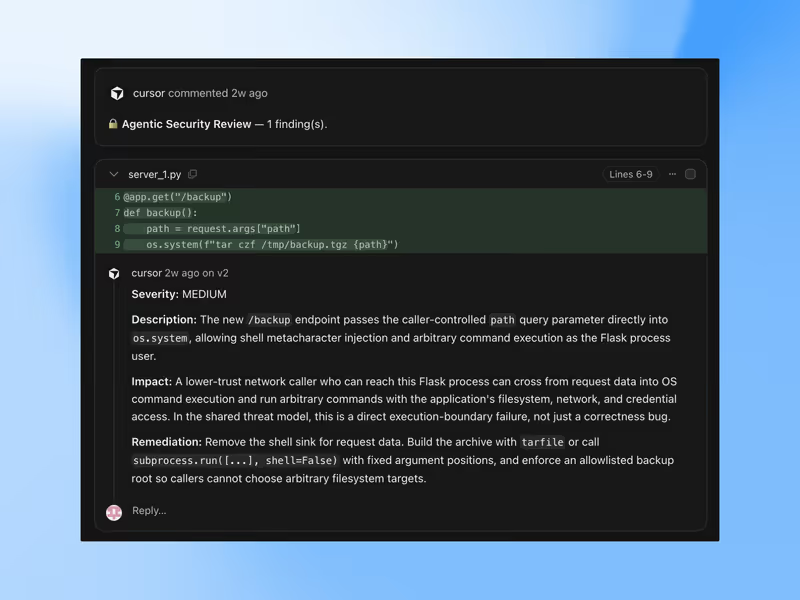
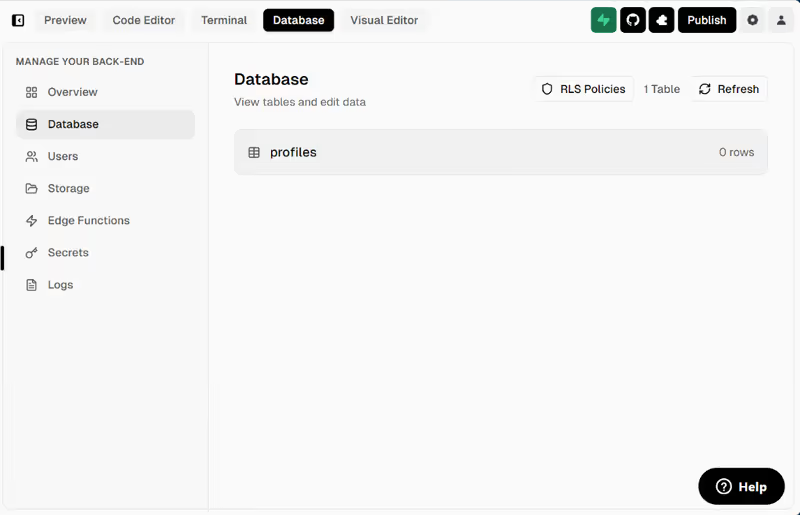
Cursor vs Softgen, on screen

cursor.com
Cursor homepage
softgen.ai
Softgen homepage

Taking a vibe-coded prototype into a real product is where Cursor and Softgen genuinely split. Cursor is an AI-first coding environment for people who expect to inspect, refactor, and ship a normal codebase; Softgen is a browser-based app generator that keeps more of the build process inside a managed prompt loop. Judging them on that handoff is more useful than judging them on who can produce a flashy first draft fastest.

This job exposes the failure modes that actually matter because production apps stop being about screenshots and start being about ownership, security-sensitive changes, repeatable fixes, and what happens when the generated structure no longer matches the product. A tool that feels fast on day one can become expensive or brittle once auth, data models, and iterative debugging enter the picture.


The audience

Who each one is for

Cursor

  • Technical founders who want AI speed but expect to review, run, and ship code themselves
  • Developers comfortable with terminals, package managers, environment variables, and normal deployment workflows
  • Product engineers working in existing repositories and needing repo-wide refactors or debugging help
  • Teams that care about handoff quality, hosting freedom, and long-term code ownership

Softgen

  • Non-technical builders who want a prompt-driven way to generate an MVP without opening an IDE
  • Indie hackers validating simple SaaS concepts, directories, or internal tools on a tight budget
  • Operators who prefer managed hosting and conversational edits over local setup and infrastructure choices
  • Founders willing to stay near templates instead of demanding deep UX or architecture control

Cursor assumes the user will eventually act like a software team. Softgen assumes the user would rather keep software behind a prompt box for as long as possible.

The scope

What you'd build with it

Cursor

  • Custom SaaS products with bespoke data models, third-party APIs, and non-trivial auth flows
  • Existing applications that need repo-wide edits, bug fixing, test generation, or structural refactors
  • Backend-heavy products where local tooling, deployment choices, and framework control matter
  • Not a fit for people who need production software without touching engineering workflows

Softgen

  • Template-led MVPs with basic CRUD, simple payments, and standard account flows
  • Public directories, listings, simple dashboards, and early SaaS validation projects
  • Managed web apps that benefit from browser-based generation and built-in hosting paths
  • Not a fit for highly customized portals, demanding UX work, or deep architectural changes

Who owns the plumbing

Cursor handles the core question by keeping the plumbing in a normal developer environment. Its value comes from repository awareness, multi-file editing, and the ability to work across standard frameworks while you control the actual implementation details for auth, database schema, secrets, deployment, and libraries such as NextAuth or Supabase. That means the generated output can mature into a real engineering asset, but only because the user is still responsible for architectural correctness and for debugging whatever the agent gets wrong.

Softgen tries to answer the same question by abstracting more of the stack into a managed generation workflow. Database structures, authentication patterns, and UI scaffolds can appear quickly, but they remain shaped by the product's template assumptions and by what the conversational editor can safely mutate later. That becomes the hinge: once the generated defaults stop matching the app you need, iterative edits can turn into prompt-heavy repair work rather than straightforward engineering changes in a standard codebase.

Strengths

Where each one is strong

Edge: Cursor

For this job, owning a standard codebase is the decisive advantage, and Cursor is built around that.

Cursor

  • Standard-code output that lives in normal repos, making handoff and long-term maintenance much cleaner
  • Repo-wide context and multi-file editing that help with refactors, debugging, and coordinated changes
  • Works inside a familiar IDE workflow with extensions, local tools, and conventional developer habits
  • Hosting and infrastructure stay under your control instead of being tied to a managed generation layer

Softgen

  • Low-friction MVP generation for users who want to describe an app instead of setting one up
  • Managed environment that reduces the amount of local configuration needed to get something live
  • Fast path to simple data-driven app shells, especially for early validation work
  • Lower entry cost for experimenting before committing to a full engineering workflow

Failure modes

Where each one breaks

Edge: Cursor

Cursor's failures are painful but legible in normal code; Softgen's failures are worse for this job because they can trap the user in a repair loop inside the product's own constraints.

Cursor

  • Developer skill required to run builds, resolve dependency issues, and verify architecture by hand
  • Agent edits can introduce unintended changes across multiple files that still need careful review
  • Large projects can strain indexing or context handling, slowing down iteration at the repo level
  • Usage limits can reduce responsiveness once fast allowances are exhausted during heavy sessions

Softgen

  • Prompt-loop fatigue when visual or structural changes need repeated conversational correction
  • Template rigidity that becomes obvious once the app needs custom UX or non-standard business logic
  • Debugging can consume credits quickly because even small fixes may take several prompt cycles
  • Exported projects can become awkward to evolve if the generated structure no longer fits the product

Iteration cost

The fix loop, priced

Edge: Cursor

A flat subscription with degraded speed is easier to live with on a fix-heavy build than a model that burns paid credits during repeated edits.

Cursor

  • Pro plan starts at $20/month and includes 500 fast premium requests plus unlimited slower use
  • Real-world burn is highest when using agent-style multi-file edits and repeated debugging passes
  • Worst case is not a surprise invoice but losing speed after fast usage is exhausted mid-iteration
  • Higher tiers such as Pro+ at $60/month raise the fast-request ceiling instead of changing the ownership model

Softgen

  • Entry pricing is about $33/year, but meaningful building depends on separately purchased AI credits
  • Real-world burn rises during revision-heavy sessions because each adjustment consumes more paid generation
  • Worst case is spending through credits on repeated prompt repairs without reaching the needed result
  • The structural risk is that iteration cost scales with how often the generated app needs correction

Both tools can look cheap until the product needs fixing; the real bill appears in iteration, not in the first draft.

Exit paths

The code you end up with

Edge: Cursor

When you want out, Cursor leaves you with a more portable and more recognizable engineering asset.

Cursor

  • Code lives in standard project structures that developers can run, inspect, and extend normally
  • You can push to GitHub, host anywhere, and use ordinary CI or deployment workflows
  • There is no proprietary runtime required to keep editing or shipping the resulting application
  • The main risk is quality control, not platform lock-in, because ownership is already yours

Softgen

  • Exports are possible, but the generated structure is shaped by Softgen's template and workflow assumptions
  • Editing exported code outside the platform can make future round-tripping awkward or impractical
  • Managed hosting convenience can become a soft lock-in if ongoing edits depend on the same environment
  • Developer handoff is harder once the product has accumulated prompt-era workarounds and generated complexity

When neither wins

If the real job is building a secure customer portal, internal tool, or CRM without becoming the maintainer of generated auth and permissions code, neither Cursor nor Softgen really wins. Cursor gives you raw ownership, but that means you still own every security-critical change in the generated stack; Softgen hides more of the process, but you are still depending on generated application logic that eventually needs validation, repair, and ongoing maintenance when requirements get more specific.

For that kind of business app, the better answer is Softr, the tool with no fix loop: auth, user groups, and record-level permissions are platform configuration rather than generated code you have to keep debugging. The honest boundary is that Softr is the wrong fit if you need a custom consumer-grade UI or if owning a normal codebase is the goal.

Verdict

Cursor wins when the prototype is supposed to become a real product, because the strongest advantage here is standard code ownership. If the app needs to survive handoff, refactoring, custom integrations, and normal engineering scrutiny, starting in a real IDE environment is the safer path.

Softgen is the right pick when the goal is narrower: validate an idea quickly, stay close to templates, and avoid local setup for as long as possible. If you mainly want a low-friction MVP shell and can tolerate conversational repair work later, its managed workflow can be enough.

For non-developers building business apps, portals, or internal systems, skip both and look at Softr instead. It removes the generated-code maintenance problem rather than merely changing who has to deal with it.

Q & A

Frequently Asked Questions

Is Cursor better than Softgen for turning an MVP into a production app?

Yes, if production means owning, debugging, and extending a standard codebase. Cursor is better suited to that transition because it works in a normal developer environment instead of keeping the app inside a prompt-led generation loop. Softgen is more comfortable at the template-MVP stage than at the long-term product stage.

Which costs more over time, Cursor or Softgen?

Cursor is usually more predictable because the main cost is a subscription tier and slower performance after fast usage runs out. Softgen can cost less at entry, but the total can become less predictable when repeated fixes and revisions consume paid credits. The more repair-heavy the build becomes, the less attractive credit-driven iteration looks.

Can I export my code from Cursor and Softgen?

Yes, but the quality of the exit is different. Cursor leaves you with a standard repository that fits normal hosting and handoff workflows. Softgen exports code too, but the project may still reflect template assumptions that make later edits and re-use less smooth.

Does Softgen lock you in more than Cursor?

In practice, yes. Cursor's output is ordinary code from the start, so leaving the tool does not fundamentally change how the app works. Softgen may let you export, but the managed generation workflow and template structure can make that exit less clean.

What should a non-developer use instead of Cursor or Softgen for a secure business app?

For a portal, CRM, or internal app, a non-developer should consider Softr instead. Its auth, user groups, and record-level permissions are configured as platform features rather than maintained as generated code. That makes it a better no-code route for business apps than either Cursor or Softgen.
