Compare Tools

Cursor vs Emergent: which is better for taking a vibe-coded prototype to a real product?

June 16, 2026

Verdict

Cursor wins if you are a developer or have a technical team to own the code; Emergent wins only if you need a rapid, hosted prototype and can afford its unpredictable AI credit burn.

Cursor logo

Cursor

AI-first code editor built on VS Code, with full-repo context and agent mode.

Emergent logo

Emergent

Fastest way to prompt out a full-stack app, if you can keep the agent from burning credits

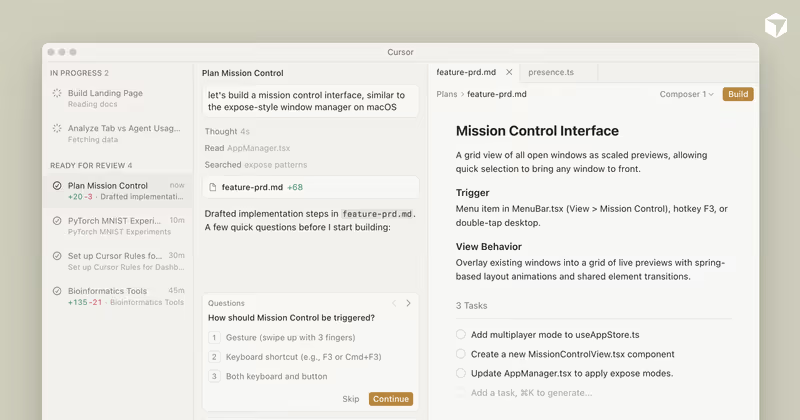
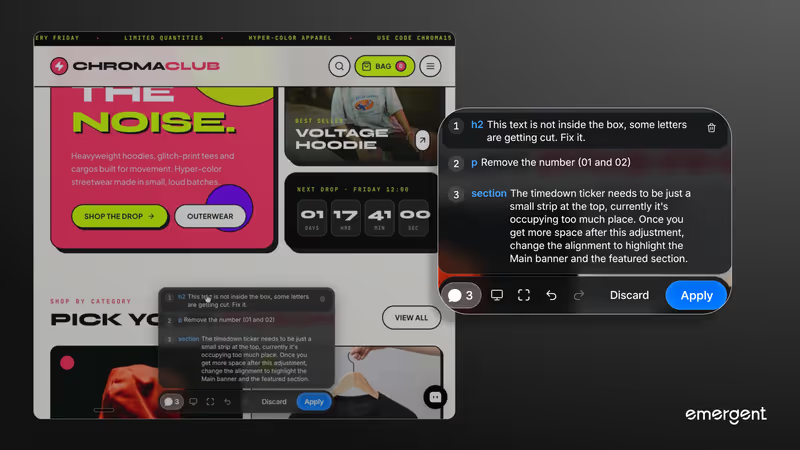
Cursor vs Emergent, on screen

cursor.com
Cursor homepage
emergent.sh
Emergent homepage

The hardest part of building software isn't prompting the first draft; it's the bridge from a working prototype to a stable product. This matchup judges Cursor and Emergent on that exact transition. Emergent scaffolds a full-stack web and mobile application, managing databases, backends, and deployment automatically from chat. Cursor is a professional code editor that integrates AI directly into your workspace, expecting you to run, manage, and understand the code yourself.

Moving an application to production exposes the deep divide between prompt-and-iterate and scaffold-and-own models. Emergent tries to keep you inside its browser container, but its agents can rapidly exhaust your credits during complex troubleshooting cycles. Cursor leaves all infrastructure and hosting management to you, but provides full project indexing and agent-driven edits across a localized workspace that you completely own from day one.


The audience

Who each one is for

Cursor

  • Developers and engineers who want to build and iterate inside a real IDE with full context.
  • Technical founders who are comfortable configuring their own databases, runtimes, and local environments.
  • Teams where code quality, manual pull requests, and security compliance are strict requirements.
  • Builders working with existing codebases who need an AI agent to safely modify specific files.

Emergent

  • Non-technical creators who want full-stack applications without managing complex build processes.
  • Product managers and agency teams who need working web or mobile UI prototypes shipped immediately.
  • Founders validating early SaaS concepts without hiring a developer to stand up hosting.
  • Builders looking to describe an idea in natural language and receive a working containerized preview.

Cursor assumes you already know how to write and compile code, serving as an accelerator on your local machine. Emergent positions itself as the entire engineering team, aiming to hide the technical plumbing entirely.

The scope

What you'd build with it

Cursor

  • Enterprise-ready production apps where you must personally inspect, test, and sign off on every library version.
  • Complexity-heavy platforms requiring local Docker assets, specific SQL configurations, and custom backend modules.
  • Any software stack - because Cursor is built on VS Code, it has zero language or framework limitations.
  • Existing systems: do not use Cursor if you want a platform that hosts your database out of the box.

Emergent

  • Full-stack web applications involving straightforward databases, user roles, and typical CRUD pipelines.
  • Early-stage transactional MVPs designed to prove a business model before a heavy engineering investment.
  • Simple responsive mobile apps that target straightforward, single-tenant visual workflows.
  • Advanced native projects: do not use Emergent for heavy systems requiring complex local infrastructure.

Who owns the context window

Emergent operates as a cloud-hosted development target. Its AI agent works directly inside its own remote WebContainers, meaning it attempts to understand your database, UI, and backend all at once, updating code dynamically as you type prompts. While this is incredibly fast for standing up initial layouts or sample database tables, it struggles when the codebase grows. As your project scales, the agent is prone to running out of context window space, leading to code regression loops where the AI introduces new bugs to fix old ones or quietly deletes collateral files because it cannot keep track of your entire runtime logic.

Cursor approaches context as an editing assistant. It builds a local vector index of your entire codebase, letting you reference specific files, imports, and directories using its composer agent. Because you run the code in your own local terminal, the AI is not responsible for keeping your server alive. The agent edits exactly the files you tell it to, letting you use standard git version control to review, edit, or undo every single line before it hits your repository. If the AI hallucinates, you are in a standard developer IDE, equipped to troubleshoot the dependency yourself.

Strengths

Where each one is strong

Edge: Cursor

Cursor secures the edge because codebase ownership and inspection are mandatory when shifting from a prototype to a real production system.

Cursor

  • Unrivaled codebase context indexing that maps your entire directory for accurate multi-file edits.
  • Full VS Code workspace compatibility, letting you keep all your favorite developer extensions, shortcuts, and themes.
  • Composer mode offers agentic editing across multiple files concurrently with clear visual diff interfaces.
  • Zero platform hosting lock-in: you own the repository, files, and deployment targets completely.

Emergent

  • Instant conversational scaffolding of full-stack apps with database configurations and cloud hosting included.
  • No local terminal, node modules, environment variable configuration, or deployment paths required from the builder.
  • Enables quick frontend, backend, and relational database creation from a single chat prompt.
  • Includes unified GitHub integrations and tasks forking to transition or replicate codebases easily.

Failure modes

Where each one breaks

Edge: Cursor

Emergent's failure modes are financially expensive and can completely break your app runtime, whereas Cursor failures are standard local build bugs.

Cursor

  • Zero turnkey infrastructure: you must manually build, configure, and maintain your database, auth, and hosting paths.
  • AI agents can occasionally loop trying to resolve complex yarn or npm node module dependencies.
  • Large repositories can experience CPU indexing lag and workspace memory freezing on standard developer laptops.
  • No visual design interface: changes are carried out entirely via code edits or raw chat prompts.

Emergent

  • The infinite debugging loop: agents can get stuck in autonomous bug-fixing cycles, rapidly exhausting your paid credits.
  • Reviewers report the AI agent frequently undoes completed features during unrelated edits, forcing repetitive prompt costs.
  • Server containers occasionally fail to wake up, blocking access to both backend environments and raw code files.
  • Production environments sometimes drift from inside-sandbox previews, leading to silent database and deployment bugs.

Iteration cost

The fix loop, priced

Edge: Cursor

Cursor offers predictable monthly flat-rate pricing, while Emergent billing can quickly scale to thousands of dollars during debugging.

Cursor

  • Cursor Pro starts at $20/month, providing 500 fast queries with unlimited slow queries.
  • There are no overage costs or credit models that penalize you for long debugging sequences.
  • If you hit query limits, you can continue using slowest-tier generation or plug in your own API key.
  • Business teams pay a flat $40/month per user for privacy guarantees and advanced collaboration features.

Emergent

  • Emergent Standard costs $20/month billed annually for just 100 credits, consuming credits per task execution.
  • Users in online dev communities have reported spending up to $10,000 AUD on sudden, agent-driven rework loops.
  • The edit agent consumes credits for every execution, including trying to resolve bugs introduced by the AI itself.
  • Unused monthly subscription credits do not roll over, forcing you to purchase credit top-ups if you hit a bad debugging trap.

Iterating on an AI-generated codebase is rarely a straight line. Every edit in the fix loop consumes tokens, making a flat-rate IDE like Cursor far safer than credit-depleting agent engines where broken code means a mounting bill.

Exit paths

The code you end up with

Edge: Cursor

Cursor outputs clean codebase architecture that any engineer can immediately understand and run locally.

Cursor

  • Generates clean, native, and industry-standard codebases managed in a local folder.
  • Maintains standard structure (e.g., Next.js, Django, Express) with zero proprietary software dependencies.
  • Complete freedom to deploy to Vercel, Railway, AWS, or any physical server of your choice.
  • A developer's paradise: the exact repo structure an engineering recruit expects to inherit.

Emergent

  • Provides a packaged application container, but community reports note output struggles when scales grow.
  • Supports standard GitHub exporting, but databases and hosting platforms require hands-on technical transition.
  • If you export to leave, you must rebuild the backend integration patterns yourself.
  • Code compiled over several conversational iterations risks turning into a Frankenstein assembly with visual bloat.

When neither wins

If you are a business builder looking to launch an internal system or a client-facing application, neither of these tools represents the right path. Both Cursor and Emergent operate on the premise that your application must be maintained using generated, hand-coded scripts. This forces you to understand, audit, and debug complex files yourself, transforming you from a business runner into an unpaid code maintainer. When the day-two problem hits and an upgrade or API version change breaks your interface, we find you'll get trapped in a frustrating, high-cost programming loop.

For operational software like customer portals, internal tracking systems, or back-office CRMs, Softr bypasses the developer overhead entirely. Softr processes security, databases, user permissions, and logins as visual platform configurations rather than raw generated files. This removes the risk of AI-fueled security vulnerabilities and completely deletes the fix loop tax because you modify layout and access permissions via checkboxes, not complex code. Softr is the wrong tool if your goal is to build a highly custom consumer product or own a raw codebase, but it is the correct choice for fast, secure business applications.

Verdict

Cursor wins this comparison unequivocally if codebase longevity, standard software patterns, and project control are your priorities. Because it runs directly on top of your local VS Code workspace, it treats your application as a standard development asset. This prevents credit-burning debugging traps, ensures data privacy compliance, and equips you to inspect every file modification in a real console. If you are an engineer or are ready to transition your prototype to a developer, work inside Cursor.

Emergent is suitable only for short-term, experimental full-stack prototyping where speed is the only metric of success. It bypasses the developer system setup, standing up databases and environments in minutes. However, because its credit pricing model charges you for the agent's internal errors and bugs, a long iteration cycle on Emergent is highly prone to stalling out on credit caps before your app is ever finished.

For business leaders and non-developers, the real takeaway is that ownership of a raw codebase brings heavy maintenance liabilities. Instead of paying prompt taxes or wrestling with local server configurations in Cursor, move your business operations to a structured no-code platform like Softr. By choosing configuration over fragile generated code, you will ship a secure tool without the fear of code regressions.

Q & A

Frequently Asked Questions

Is Cursor better than Emergent for building web applications?

Cursor is better if you have technical skills or a team to run and test code, because it leaves you with a standard local repository and absolute control. Emergent is only better for non-technical users who want a simple prototype scaffolded instantly in a browser and are willing to risk unpredictable credit charges.

Can I export my code from Emergent?

Yes, Emergent supports GitHub integration and standard code exporting. However, once you export the repository to host it elsewhere, you must manually set up and connect your own databases, hosting servers, and integration API settings.

How do pricing models compare between Cursor and Emergent?

Cursor offers a flat-rate pricing model starting at $20 per month with no task-based query billing. Emergent uses a task-based credit model where editing and bug-fixing loops deduct credits from your monthly pool, often leading to unexpected, heavy billing spikes during complex codebase maintenance.

What is the best alternative to Cursor and Emergent for business internal tools?

The best alternative is Softr. Instead of generating code that you have to inspect and compile, Softr builds tools on a solid no-code foundation where permissions, databases, and login portals are handled visually without coding regressions.
